Education Technology

Let’s look at teaching and learning with a fresh perspective

Join fellow educators to connect, share and learn from one another at the
T³™ Learns Summit, a special event hosted by Texas Instruments, March 25–27, 2022.

We’re coming together to think forward in math, science and STEM education, exploring ways to strengthen teachers’ expertise and raise student achievement to new heights.

Registration is complimentary for this invitation-only event and is open through March 14.
Register for free I will not attend

What’s on the agenda: Preparing students for college and career readiness

We’re excited to bring you hands-on, interactive sessions that cover a wide range of topics focused on enhancing teaching and learning.

  • Explore strategies for integrating TI technology and math and science resources into the classroom to promote active engagement
  • Learn different approaches to stimulating students’ critical thinking and problem-solving skills
  • Build up your STEM know-how and discover ways to leverage TI technology within the classroom and beyond

Schedule at a glance: What’s included when you attend

Friday, March 25 Welcome reception | 6 – 7:30 p.m.
Saturday, March 26 Breakfast | 7:30 – 8:15 a.m.
Opening session | 8:15 – 9:15 a.m.
Learning Lounge | 9:00 a.m. – 4 p.m.
Breakout sessions | 9:30 a.m. – 4:45 p.m.
Dinner | 6:30 – 8 p.m.
Sunday, March 27 Math Yoga | 7 – 7:45 a.m.
Breakfast | 8 – 9 a.m.
Closing session | 9:15 – 10:15 a.m.

Topics include:


  • Coding with Python
  • CAS for algebra
  • Data collection and analysis
  • Differentiated instruction
  • Financial literacy
  • Growth mindset
  • High-stakes and EOC test-prep strategies
  • Mathematical language routines
  • Mathematical modeling
  • STEM projects
  • Strategies to address unfinished learning
  • And more!

You’re invited to stay for free

Your hotel accommodation is complimentary for Friday and Saturday night.

Location: Omni® Dallas Hotel
Address: 555 S. Lamar St., Dallas, TX 75202

Once you've registered to attend the event, request your room by contacting us at t3learns@list.ti.com.

COVID-19 safety protocols

While we are monitoring CDC guidelines and local regulations in order to ensure this event is as safe as possible, TI and the Omni® Dallas cannot guarantee that attendees will not be exposed to COVID-19. We ask that all attendees follow the safety protocols we put in place. It is up to each attendee to make sure they are following these protocols and taking steps to keep themselves as safe as possible.

View health and safety details

Questions and cancellations

If you have any questions about the summit, please reach out to us at t3learns@list.ti.com.

If you have registered and can no longer attend the summit, please contact us at your earliest convenience to cancel your registration.

Also, be sure to cancel your hotel reservation; you can reach the support team, Connections Housing, at 702.476.6976.

Omni is a registered trademark of its owner.

Schedule of events

Here are the program details for the T³ Learns Summit. Please select the links below to view more information for each event or session.

You can download session materials from the presenters who post them in this Dropbox:

View session materials

Friday, March 25

5 – 9 p.m.

Event Location
Registration Level Three

5 – 8 p.m.

Headshot photography station Level Three, near escalators

6 – 7:30 p.m.

Welcome reception Level Three, Dallas Ballroom ABCDH


Saturday, March 26

6:30 a.m. – noon

Event Location
Registration Level Three

7 a.m. – 6:30 p.m.

Headshot photography station Level Three, near escalators

7:30 – 8:15 a.m.

Breakfast Level Three, Dallas Ballroom ABCDH

8:15 – 9:15 a.m.

Opening session:
Michelle Rinehart, “Equity in Education: The Role for Leaders”
Level Three, Dallas Ballroom ABCDH

9 a.m. – 4 p.m.

Learning Lounge Level Three, Dallas Ballroom E

Breakout sessions #1

9:30 – 10:50 a.m.

Title Technology View details
DifferenTIation Through AcTIve ParTIcipation
TI-84 Plus CE graphing calculator,
TI-Nspire™ CX II graphing calculator
Working With Data Is Working With the Real World, and TI-Nspire™ Technology Is Just the Tool for Your Students’ Journey
TI-Nspire™ CX II graphing calculator,
TI-Nspire™ CX Navigator™ System,
CBR™ 2 motion sensor
It All Makes Cents: Connecting Mathematics to Financial Literacy
TI-Nspire™ CX II graphing calculator
Providing Feedback — Critique Not Criticize
TI-Nspire™ CX II CAS graphing calculator,
TI-Nspire™ CX Navigator™ System
Developing Student Strategic Thinking With Non-Routine Problems
TI-Nspire™ CX II graphing calculator,
TI-Nspire™ CX II CAS graphing calculator
Recreational Mathematics, TI Technology and Coding
TI-Nspire™ CX II CAS graphing calculator,
TI-84 Plus CE Python graphing calculator
Teaching for Learning in the Digital Age
TI-Nspire™ CX Premium Teacher Software
Exploring the Grooviness of Math and Science
TI-Nspire™ CX II graphing calculator,
TI-Innovator™ Hub
Texas EOC Strategies With TI Technology
TI-84 Plus CE graphing calculator,
TI-Nspire™ CX II graphing calculator
Making Sense of Statistical Variability Via Simulation
TI-Nspire™ CX II graphing calculator,
TI-Nspire™ CX Premium Teacher Software
TI Python Does Not Bite
TI-84 Plus CE Python graphing calculator,
TI-Nspire™ CX II graphing calculator
Planning a Better Math Unit Using TI Technology
TI-Nspire™ CX II graphing calculator,
TI-Nspire™ CX Navigator™ System,
CBR™ 2 motion sensor
DifferenTIation Through AcTIve ParTIcipation
Working With Data Is Working With the Real World, and TI-Nspire™ Technology Is Just the Tool for Your Students’ Journey
It All Makes Cents: Connecting Mathematics to Financial Literacy
Providing Feedback — Critique Not Criticize
Developing Student Strategic Thinking With Non-Routine Problems
Recreational Mathematics, TI Technology and Coding
Teaching for Learning in the Digital Age
Exploring the Grooviness of Math and Science
Texas EOC Strategies With TI Technology
Making Sense of Statistical Variability Via Simulation
TI Python Does Not Bite
Planning a Better Math Unit Using TI Technology

Breakout sessions #2

11:10 a.m. – 12:30 p.m.

Title Technology View details
What Does a Telescope See? Collect Data and Ask a Python
TI-84 Plus CE Python graphing calculator,
TI-Nspire™ CX II graphing calculator
Accelerating Student Learning
TI-84 Plus CE graphing calculator,
TI-Nspire™ CX II graphing calculator
Bridging the STEM Acronym — Connecting Science and Math
TI-Nspire™ CX II graphing calculator,
CBR™ 2 motion sensor
Leveraging CAS in the Algebra I/II Classroom
TI-Nspire™ CX II CAS graphing calculator
Providing Feedback — Critique Not Criticize
TI-Nspire™ CX II CAS graphing calculator,
TI-Nspire™ CX Navigator™ System
Notice and Wonder With TI Tools for Exploring Families of Functions
TI-84 Plus CE graphing calculator,
TI-Nspire™ CX II graphing calculator
Using Pictures to Expand Students’ Awareness of the World
TI-Nspire™ CX II graphing calculator
8 Helpful Strategies to Help Students Better Prepare for ACT® and SAT® Tests
TI-84 Plus CE graphing calculator,
TI-Nspire™ CX II graphing calculator
A Remote Possibility: Connecting With Coding Online
TI-Nspire™ CX II graphing calculator,
TI-Nspire™ CX II CAS graphing calculator,
TI-Innovator™ Hub
What We Do to Help Students Love Math
TI-Nspire™ CX II CAS graphing calculator,
TI-Nspire™ CX Premium Teacher Software
Building Positive Mathematical Thinkers
TI-84 Plus CE graphing calculator
Introduction to Python Coding With the TI-Innovator™ Hub and Rover
TI-84 Plus CE Python graphing calculator,
TI-Nspire™ CX II graphing calculator,
TI-Innovator™ Hub,
TI-Innovator™ Rover
Implementing Tasks That Promote Reasoning and Problem-Solving in Mathematics Classrooms
TI-Nspire™ CX II graphing calculator,
TI-Nspire™ CX II CAS graphing calculator,
TI-Nspire™ CX Navigator™ System
What Does a Telescope See? Collect Data and Ask a Python
Accelerating Student Learning
Bridging the STEM Acronym — Connecting Science and Math
Leveraging CAS in the Algebra I/II Classroom
Providing Feedback — Critique Not Criticize
Notice and Wonder With TI Tools for Exploring Families of Functions
Using Pictures to Expand Students’ Awareness of the World
8 Helpful Strategies to Help Students Better Prepare for ACT® and SAT® Tests
A Remote Possibility: Connecting With Coding Online
What We Do to Help Students Love Math
Building Positive Mathematical Thinkers
Introduction to Python Coding With the TI-Innovator™ Hub and Rover
Implementing Tasks That Promote Reasoning and Problem-Solving in Mathematics Classrooms

Lunch break

12:30 – 1:50 p.m.


See hotel dining options
Find nearby restaurants

Breakout sessions #3

1:50 – 3:10 p.m.

Title Technology View details
Engaging Students With Math in the Virtual Environment
TI-84 Plus CE graphing calculator,
TI-Nspire™ CX II CAS graphing calculator,
TI-SmartView™ CE emulator software,
TI-Nspire™ CX Premium Teacher Software
Accelerating Student Learning
TI-84 Plus CE graphing calculator,
TI-Nspire™ CX II graphing calculator
Dig Into Data: Collection and Analysis for Math and Science With TI-84 Plus Technology
TI-84 Plus CE graphing calculator
Leveraging CAS in the Algebra I/II Classroom
TI-Nspire™ CX II CAS graphing calculator
DifferenTIation Through AcTIve ParTIcipation
TI-84 Plus CE graphing calculator,
TI-Nspire™ CX II graphing calculator
Hawaii, Hurricanes, Hog and Herd Immunity — Mathematical Modeling With TI Technology
TI-84 Plus CE graphing calculator,
TI-Nspire™ CX II graphing calculator
If Not Algorithms, Then What?
No technology
8 Helpful Strategies to Help Students Better Prepare for ACT® and SAT® Tests
TI-84 Plus CE graphing calculator,
TI-Nspire™ CX II graphing calculator
TI STEM Project: Coding the Sounds of Music
TI-Nspire™ CX II graphing calculator,
TI-Innovator™ Hub
Advanced Quantitative Reasoning: Numeracy, Statistics and Modeling
TI-Nspire™ CX II CAS graphing calculator
Python Coding in the Science Classroom
TI-84 Plus CE Python graphing calculator,
TI-Nspire™ CX II graphing calculator,
TI-Innovator™ Hub
Python Programming for the Mathematics Classroom
TI-84 Plus CE Python graphing calculator,
TI-Nspire™ CX II graphing calculator,
TI-Innovator™ Hub,
TI-Innovator™ Rover
Why We Switched From TI-84 Plus to TI-Nspire™ Technology
TI-84 Plus CE graphing calculator,
TI-Nspire™ CX II CAS graphing calculator
Engaging Students With Math in the Virtual Environment
Accelerating Student Learning
Dig Into Data: Collection and Analysis for Math and Science With TI-84 Plus Technology
Leveraging CAS in the Algebra I/II Classroom
DifferenTIation Through AcTIve ParTIcipation
Hawaii, Hurricanes, Hog and Herd Immunity — Mathematical Modeling With TI Technology
If Not Algorithms, Then What?
8 Helpful Strategies to Help Students Better Prepare for ACT® and SAT® Tests
TI STEM Project: Coding the Sounds of Music
Advanced Quantitative Reasoning: Numeracy, Statistics and Modeling
Python Coding in the Science Classroom
Python Programming for the Mathematics Classroom
Why We Switched From TI-84 Plus to TI-Nspire™ Technology

Unconference sessions

3:30 – 4 p.m.

Event Location Details
Unconference sessions Various Download schedule

4:15 – 4:45 p.m.

Unconference sessions Various Download schedule

Dinner

6:30 – 8 p.m.

Event Location
Dinner and 2020 T³ Leadership Awards Level Three, Dallas Ballroom ABCDH

Sunday, March 27

7 – 7:45 a.m.

Event Location
Energize Your Morning With Math Yoga Level Three, Dallas Ballroom EFG

8 – 9 a.m.

Breakfast Level Three, Dallas Ballroom ABCDH

9 – 10:15 a.m.

Closing session:
Derrick Pitts, “Stars for Everyone” and
2022 T³Leadership Awards
Level Three, Dallas Ballroom ABCDH

SAT® is a trademark registered by the College Board. ACT is a registered trademark of ACT, Inc. Neither are affiliated with, nor endorse, TI products. Policies subject to change.
Visit www.collegeboard.org and www.act.org.

Hotel and travel information for your T³™ Learns Summit experience

Enjoy your stay at the Omni® Dallas Hotel

Your hotel accommodation is complimentary both Friday and Saturday. After you've registered for T³™ Learns Summit, please reserve your hotel room by contacting us at t3learns@list.ti.com.

Address: 555 S. Lamar St., Dallas, TX 75202 (Find it on Google Maps)
Check-in: 4 p.m. Guests arriving earlier will be accommodated as rooms become available.
Check-out: 11 a.m.
Parking: Discounted $15 overnight for self-parking, or $34 overnight for valet

Book your stay

Convenient dining options during your stay

While you are in town for TI's summit, be sure to explore the great dining experience within and nearby the hotel.


While some hotel and nearby restaurants have limited hours, these restaurants are confirmed to be open for lunch on Saturday during our summit:

Travel and transportation information

Get the information you need on driving directions, transportation services and parking details to make your way to the Omni® Dallas Hotel.

TI’s plans for a safe and successful T³ Learns Summit

Texas Instruments is committed to holding a successful in-person summit this March at the Omni® Dallas Hotel in downtown Dallas. By registering for this event, you agree to adhere to all event protocols for health and safety.


Safe entry protocols

To ensure the safety of all attendees, TI requires proof of a negative COVID-19 PCR test taken within 72 hours before the event or voluntary submission of proof of full COVID-19 vaccination (for example, copy of your vaccination card). Please submit your supporting documentation through the COVID-19 verification app, CLEAR Health Pass, no later than 24 hours before the event.

TI and the Omni® Dallas Hotel will not provide coronavirus testing on-site, but Dallas County provides information to assist visitors in obtaining a test if they need one.

If you have tested positive or are not vaccinated and have been exposed to someone who has tested positive for COVID-19 within 10 days of the event, please do not participate in, or attend, the event. Please view the CDC's Coronavirus Self-Checker to learn more about the COVID-19 virus and potential symptoms of concern. Please email t3learns@list.ti.com if you test positive for COVID-19 within 10 days of the event and are unable to attend.

If you begin experiencing symptoms 24 hours prior to traveling to the conference, please either have a COVID-19 test completed or stay at home.


CLEAR Health Pass

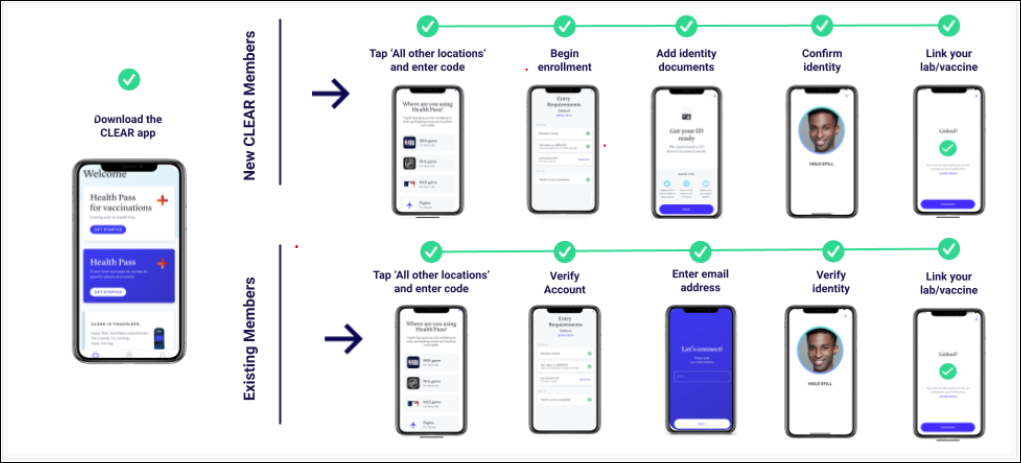
The T³ Learns Summit is using CLEAR Health Pass, which provides a secure, digital proof of COVID-19 related health insights, to verify proof of a negative COVID-19 PCR test or for voluntary submission of proof of full COVID-19 vaccination. CLEAR Health Pass is a free service on the CLEAR app.

CLEAR Health Pass with PCR test

The first option is to provide proof of a negative PCR test before the event.

  1. Download the free CLEAR app using one of the buttons below.

  2. Tap on the white “Health Pass” tile, select “Have a code?” and enter the unique health passcode: EFATTENDEE212

  3. Tap “Enroll or verify you’re in CLEAR” to create your free CLEAR member account.
    1. New to CLEAR? When prompted, enter the email address you used for registration, your phone number, and have your government-issued photo ID ready to complete enrollment.
    2. Already a CLEAR member? Make sure your email address matches the one you used for registration.

  4. Confirm your identity by uploading your government-issued photo ID and by taking a selfie.

  5. Schedule your test for 72 hours before entry to the summit. You must use a testing facility available through the CLEAR app. You can find a provider near you by clicking on Profile > Connected Health Providers.

    The test should be taken no earlier than March 22 at 7:30 a.m. Central time, and the cutoff time for submitting approved tests is March 25 at 7:30 a.m. Central time.

  6. Follow the prompts on the “Entry Requirements” page and link your negative COVID-19 PCR test result using the patient portal or provider link.

  7. Tap “Open Health Pass” to get your result. Green means you’ve met the requirements. Please note it can take up to 24 hours to receive your result. Please disregard the 24-hour expiration; it will not affect your submission.

  8. Have your CLEAR Pass approval screen open when you proceed to the registration area at the summit.

CLEAR Health Pass with vaccination card

The second option is to provide voluntary proof of COVID-19 vaccination.

  1. Download the free CLEAR app using one of the buttons below.

  2. Tap on the white “Health Pass” tile, select “Have a code?” and enter the unique health passcode: EFATTENDEE212

  3. Tap “Enroll or verify you’re in CLEAR” to create your free CLEAR member account.
    1. New to CLEAR? When prompted, enter the email address you used for registration, your phone number, and have your government-issued photo ID ready to complete enrollment.
    2. Already a CLEAR member? Make sure your email address matches the one you used for registration.

  4. Confirm your identity by uploading your government-issued photo ID and by taking a selfie.

  5. Schedule your test for 72 hours before entry to the summit. You must use a testing facility available through the CLEAR app. You can find a provider near you by clicking on Profile > Connected Health Providers.

    The test should be taken no earlier than March 22 at 7:30 a.m. Central time, and the cutoff time for submitting approved tests is March 25 at 7:30 a.m. Central time.
  6. Follow the prompts to include your proof of vaccination.

  7. A green “Attendee Health Pass” means you’ve submitted the requirements to the T³ Learns Summit. Please disregard the 24-hour expiration; it will not affect your submission.

  8. Have your CLEAR Pass approval screen open when you proceed to the registration area at the summit.

Need help? Call 855.CLEAR.ME, or tap “Get in Touch” in the app for assistance.

If you are unable to use the CLEAR app, please contact us at t3learns@list.ti.com.

Note: CLEAR will not share your specific data about your vaccination or test results with Texas Instruments.


Health and safety/CLEAR app FAQs

What type of negative COVID-19 test is required?

To use the CLEAR Health Pass to verify your negative test, you must submit proof of a negative PCR test taken within 72 hours of the event and submitted no later than 24 hours before the event. Please note that a PCR test may take several days to get results. If you have concerns about this requirement, please contact us at t3learns@list.ti.com.

What if my PCR test returns a false positive?

There can be many variables that affect COVID-19 test results. Unfortunately, we cannot allow entry to the event if the result of the PCR test is positive for any reason.

Can I substitute a different test for a PCR test?

A PCR test or voluntary submission of proof of full COVID-19 vaccination is required for event participation. If you have concerns about this requirement, please contact us at t3learns@list.ti.com.

How do I locate my testing center and connect to the CLEAR app?

Within Health Pass, tap “Add COVID test” in the entry requirements checklist to begin. Select your testing provider within the menu or search “other providers.” Login to your patient portal and follow instructions to link your account with CLEAR securely. The CLEAR app is integrated with select healthcare providers and pharmacies. If you are unable to find your provider or unable to link a test, please contact t3learns@list.ti.com.

What if I cannot find a provider in the CLEAR app?

The CLEAR app offers hundreds of lab and pharmacy opportunities through the patient portal. If you are unable to find a provider in your area on the CLEAR app, please contact us at t3learns@list.ti.com.

What does “full COVID-19 vaccination” mean?

“Full COVID-19 vaccination” means two doses of the two-dose Pfizer or Moderna vaccine or one dose of the Johnson & Johnson vaccine.

What if I’m an international attendee and my vaccination card is not recognized?

If you are located outside the U.S. and would like to upload your COVID-19 vaccination status, choose the “SMART Health QR Code” option within the CLEAR App.

What happens if I do not submit my COVID-19 negative test or proof of vaccination prior to arriving at the summit?

Lack of negative test validation or vaccination provided in advance of the event can result in the denial of entry into the T3™ Learns Summit. If you do have proof of a negative COVID-19 PCR test or vaccination, and arrive on-site without submitting your documentation via the CLEAR app, please proceed to the Health and Safety Help Desk near the registration area.

How is my information protected in the CLEAR app?

CLEAR is committed to protecting its members’ information. You can read more details about this in CLEAR’s Privacy Policy. Note that CLEAR will not share your specific data about your vaccination or test results with Texas Instruments.

What are alternatives to using the CLEAR app?

If you cannot use the app or are unable to find a provider in your area to complete testing, please contact us at t3learns@list.ti.com.

Will there be testing available on-site?

The T3™ Learns Summit and the Omni® Dallas Hotel will not have on-site testing available. Dallas County provides information to assist visitors in obtaining a test if they need one. However, we strongly recommend taking a COVID-19 test before you depart for the venue for your own peace of mind.

What happens if I begin to experience COVID-19 symptoms during the summit?

Please use the CDC's Coronavirus Self-Checker to get help assessing symptoms. If you are experiencing symptoms, please:


On-site health and safety measures

Masks recommended

  • We recommend that all attendees wear a mask during indoor meetings and summit sessions unless you are eating, drinking or presenting.
  • Face coverings will be available on-site, but we encourage you bring a mask with you.

Social distancing

  • We are asking everyone to take personal responsibility and practice social distancing so that all attendees feel comfortable.
  • Where directed, please observe and follow directional traffic flow.
  • Floor graphics and/or stanchions will be used to encourage social distancing in common areas.
  • Meeting room capacities account for social distancing within the room and at each table. Please help us adhere to room capacities by maintaining social distancing in sessions.

Session capacity limits

  • Rooms will be set to accommodate the social distancing requirements at the time of the summit.
  • Please do not overcrowd a room. If you enter a room and there is no seating, please go to another session. Look for “Session Full” transparency signs that will be placed over the session information signage.
  • Hall monitors will be on site to help remind attendees about well-being and social distancing protocols.

TI technology within sessions

  • TI technology will be cleaned prior to delivery to session rooms.
  • Alcohol prep pads will be provided in the session breakout rooms so attendees are able disinfect their TI technology if they desire between breakout sessions.

Cleaning

The Omni® Dallas will implement increased cleaning and sanitization in all high-touch building areas, including, but not limited to, the following:

  • Front desk counters
  • Guest room keys
  • Elevator buttons
  • Staircase and escalator handrails
  • Restrooms
  • All entrance revolving door handles, main door handles, and push bars
  • ATM machines

Hotel staff will increase the frequency of cleaning and disinfecting of shared items and high-touch surfaces in the T³ Learns Summit meeting space throughout the day, while deep cleaning each night.

For more information on the Omni® Dallas cleaning process and readiness, visit the Omni® Safe and Clean website.

Audio/visual equipment (PSAV-Encore) cleaning guidelines:

  • High-touch equipment is disinfected after each session.
  • Staff will use hand sanitizer throughout the day and after every client interaction.

Hand sanitizer

  • Hand sanitizer will be provided throughout the venue.


Omni is a registered trademark of its owner.

2022 T³™ Learns Summit FAQs

Registration questions

Is there a registration fee for participants to attend?

No, T³™ Learns Summit is an invitation-only event and registration is free for invitees. Register today.

Are any travel expenses covered by TI?

Yes, TI offers participants complimentary hotel accommodations for two nights during the summit, Friday, March 25, and Saturday, March 26. Reserving additional nights will be charged at the participant’s expense.

What expenses am I responsible for?

Participants are responsible for airfare and travel to and from the summit, in addition to any parking fees and incidental expenses such as outside meals.

When reserving your hotel room, a credit card number is also required in the event of incidental expenses charged to your room or for extended stays.

If I wish to extend my hotel stay, how should I book additional hotel nights?

To book additional nights, please contact our support team, Connections Housing, by email or call 702.476.6976.

Will I receive a confirmation email for my summit registration?

Yes. After you’ve submitted your registration form for T³™ Learns Summit, we’ll send you a confirmation email to the address provided.

Do I need to bring my registration confirmation to the summit?

Bringing a printed or digital copy of your summit registration is recommended, but not required.

When do I receive my summit badge?

Your summit badge will be available for pickup at the registration desk on Friday, March 25, and the morning of Saturday, March 26.

If I can no longer attend, how do I cancel my registration? Will I be responsible for any costs?

If for any reason you cannot attend the summit, please contact us at your earliest convenience to cancel your registration. You may cancel your hotel reservation online or by calling 702.476.6976.

Please note: If your hotel room is not canceled within 72 hours of the summit, you will incur the cost of one night’s stay to the credit card on file.

If I cannot attend, may a colleague attend in my place?

If you cannot attend and would like to suggest a colleague come in your place, please contact us.

General questions

Where will the T³™ Learns Summit take place?

The summit takes place at the Omni® Dallas Hotel located at 555 S. Lamar St., Dallas, TX 75202. Find it on Google Maps.

Will food be served during the summit?

Yes, we’ll provide appetizers during the evening reception on Friday, breakfast and dinner on Saturday, and breakfast again on Sunday.

What is the recommended attire?

The suggested attire is business casual.

How many attendees will be at the summit?

We anticipate hosting approximately 400 participants at the summit.

Who will be attending the summit?

We’re inviting educators and administrators to connect and explore ways to enhance math, science and STEM education. Our summit guests will include:

  • School and district leaders
  • Math, science, computer science, CTE and STEM educators and educational leaders
  • T³™ Instructors
  • T³™ Teacher Leader Cadre (TLC) participants
What is the event hashtag?

We encourage attendees to share what they are learning using #T3Learns.

Will Wi-Fi be available during the summit?

Yes, free Wi-Fi access is available in hotel guest rooms and in meeting spaces throughout the summit.

Will I receive a Certificate of Attendance?

Absolutely! All participants will receive a Certificate of Attendance.

What health and safety measures will be implemented for the summit?

TI takes the safety of all participants seriously. We’ll be working closely with local health officials, venue personnel and internal staff to follow safety guidelines, maintain clean and healthy environments, and plan for measures in case someone should become ill.

Please see the Health and Safety page for details on the measures being implemented for the summit.
Read more about Omni® Dallas Hotel’s health and safety protocols.