


Inequality Graphing App
How do I calculate the vertices of the feasible region?
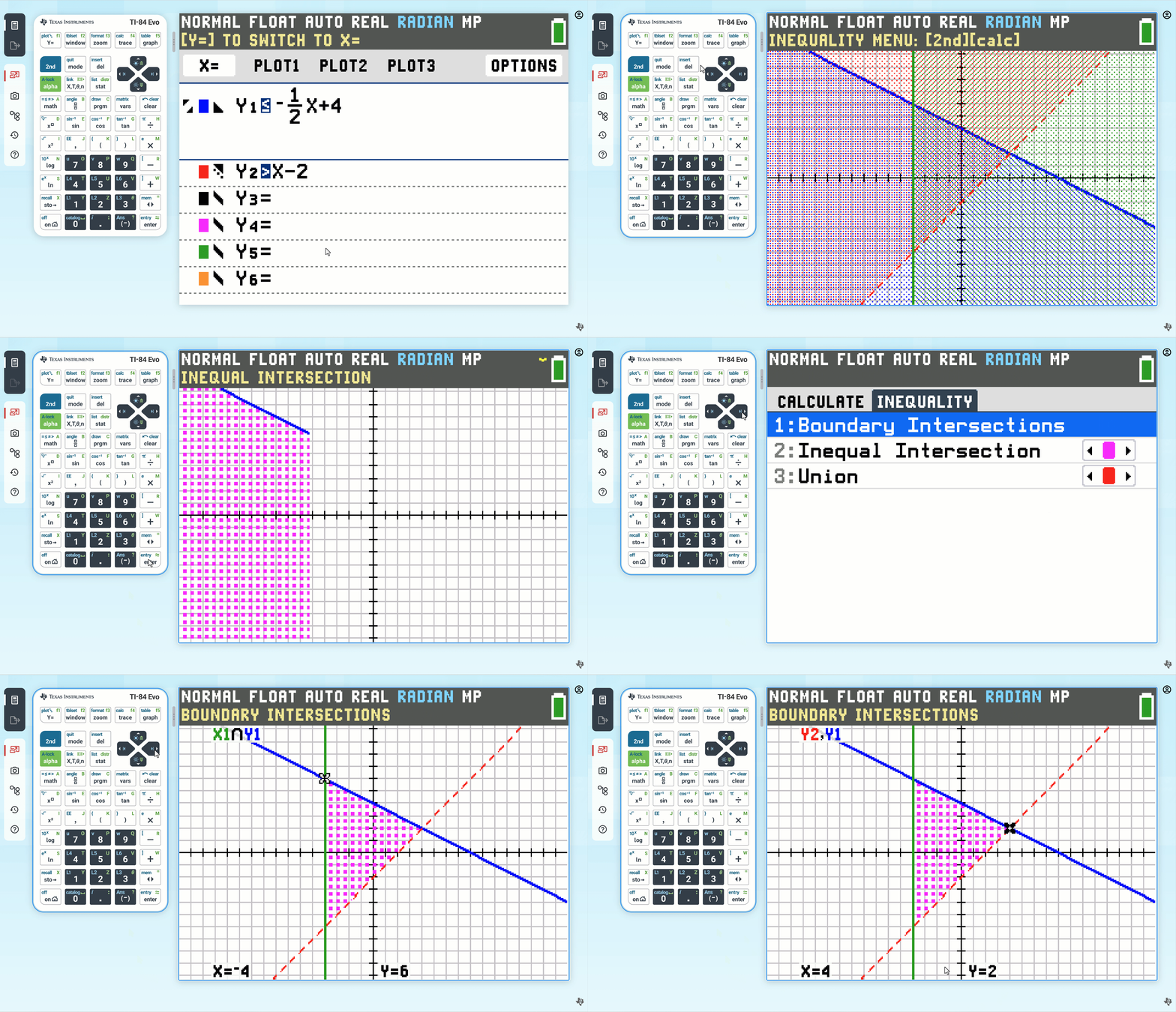
To calculate the vertices of the feasible region, follow these steps:
Example:
Shade the feasible region for the following inequalities:
\(y<= -1/2X +4\)
\(y>X - 2\)
\(X >= -4\)
1. Press the Inequality Graphing App icon  .
.
2. Graph the feasible region following the steps in feasible region.
3. Press a à to CALCULATE menu.
4. Press right arrow key › to INEQUALITY menu.
5. Select option 1 "Boundary Intersections"
6. The boundary intersections for the first two relations are computed.
7. To move between all the boundary intersections, right arrow keys › and left arrow keys ‹ will move among the intersections between the first relation and any other it intersects.
8. Up arrow keys ≤ and down arrow keys ≥ will change focus to other relations. Then use the right › and left ‹ arrow keys to find intersections between the relation in focus and other relations.