
Solution 40507: Multiplying a Matrix Row by a Value on the TI-84 Evo.
How can I multiply a row of a matrix by a value on the TI-84 Evo?
To multiply a row within a matrix by a single value, please follow the example listed below:
Example: MATRIX [A]

Solution:
1) Create a new matrix by pressing [2nd] [matrix] and then pressing [←] to select the EDIT menu.
2) In the edit menu press [1] to edit [A]
3) Once a matrix name has been selected, the user will be prompted for the dimensions of the matrix. For this example, press [3] [enter] [3] [enter] to create a 3 X 3 matrix.
4) Input data from MATRIX [A] in the image above by entering [1] [enter] [2] [enter] [3] [enter] [4] [enter] [5] [enter] [6] [enter] [7] [enter] [8] [enter] [9] [enter]
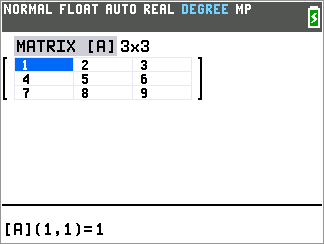
5) Press [2nd] [mode] to return to the home screen of the calculator.
6) Press [2nd] [matrix], then [→] to select MATH
7) In the math menu press [alpha] [cos] to select F: *row( and paste this command to calculator screen.
Please Note: The syntax for the *row( command is: *row(single mulitplied value,matrix name,matrix row).
8) After the paratheses enter [5] [ , ] [2nd] [matrix] [1] [ , ] [2] [ ) ]
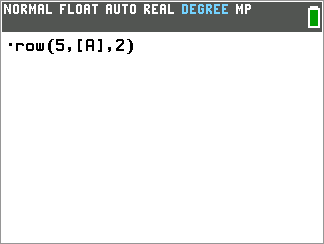
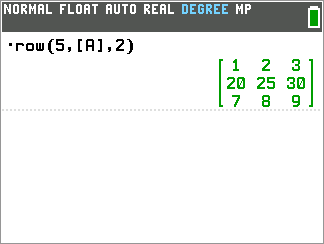
9) Press [enter] to multiply row 2 in matrix [A] by 5.
Please see the TI-84 Evo User Guide for additional information.