
Solution 40499: Finding the Intersection of Two Functions on the TI-84 Evo.
How can I find the intersection of two functions on the TI-84 Evo?
The intersect operation (selectable from the CALCULATE menu) finds the coordinates of a point at which two or more functions intersect.
Please Note: The intersection must appear in the window range to use intersect command. Use [Zoom] [3] [Enter] to zoom out if your intersection is outside the default window range.
Refer to the following example in order to calculate the intersection of the graphs of two functions.
Example:
Find the intersection of the following functions:
x + 1
2x + 4
Solution:
1) Press [Y=] to display the Y= Editor.
2) Press [X,T,θ,n] [+] [1] [ENTER].
3) Press [2] [X,T,θ,n] [+] [4] [ENTER].
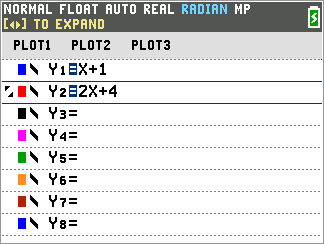
4) Press [Zoom] then [5] to display the graphs of the two functions using the default zoom.
5) Press [2ND] then [Trace] followed by [5] to select 5:intersect
Please Note: The below two steps will only appear if a third graph is listed if only two functions are graphed the next two options will not appear. If only two functions are graphed skip to step 8.
6) When "First curve?" is displayed, press [↑] or [↓] if necessary to move the cursor to the first function and press [ENTER]
7) When "Second curve?" is displayed, press [↑] or [↓] if necessary to move the cursor to the second function and press [ENTER]
8) When "Guess?" is displayed, use [←] and/or [→] to move the cursor to the point closest to the location of the intersection and press [ENTER]
Please Note: The calculator requires that a guess be made in case the functions being graphed intersect more than once. This is to specify which intersection of the two selected functions to find in that case.
The cursor is on the solution and the coordinates are displayed, even if CoordOff format is selected. Intersection is displayed in the bottom. To restore the free-moving cursor, press any of the directional keys.
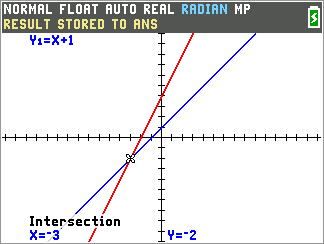
An alternative method to find the intersection is below:
1) If points of interest trace is turned on press the trace key and move the cursor over the intersection point and the intersection will be displayed.
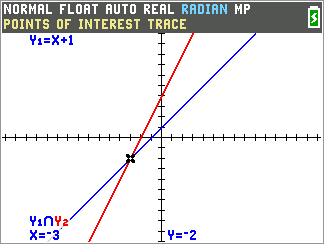
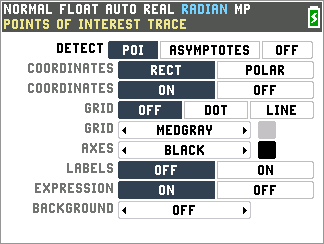
2) If this does not appear verify points of interest trace is turned on by pressing [2nd] then [Zoom] and verify [POI] is highlighted black if not select it and press [Enter].
Please see the TI-84 Evo User Guide for additional information.