
Solution 40498: Calculating the Confidence Interval for Slope on the TI-84 Evo.
How can I calculate the confidence interval for slope on the TI-84 Evo?
To calculate the confidence interval for a slope follow the example below:
Example:
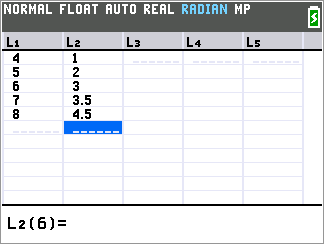
L1: {4,5,6,7,8}
L2: {1,2,3,3.5,4.5}
Solution:
• Press [STAT] [1] to enter the STATS editor.
• Press [4] [ENTER] [5] [ENTER] [6] [ENTER] [7] [ENTER] [8] [ENTER].
• Press [►].
• Press [1] [ENTER] [2] [ENTER] [3] [ENTER] [3] [.] [5] [ENTER] [4] [.] [5] [ENTER].
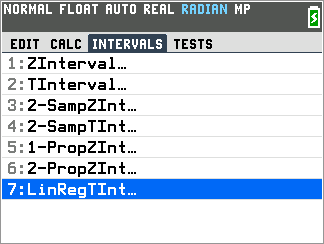
• Press [STAT].
• Press [►] [►] to select the INTERVALS Menu.
• Press [7] to select 7:LinRegTInt...
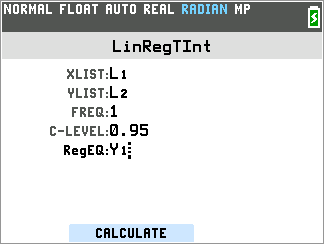
• Press [2ND] [L1] [ENTER] for Xlist.
• Press [2ND] [L2] [ENTER] for Ylist.
• Press [1] [ENTER] for Freq.
• Press [.] [9] [5] [ENTER] for C-Level.
• Press [Alpha] then [Trace] followed by [1] and Y1 will be pasted next to RegEQ: to show that the regression equation will be stored under Y1.
• Press [Window] or [Zoom] to display the results.
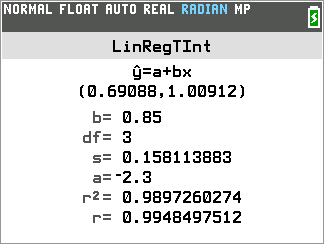
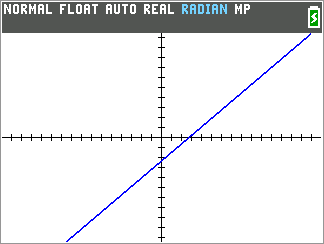
• Press [GRAPH] to see the regression.
Please see the TI-84 Evo User Guide for additional information.