

Science Tools App
Science: Science General: General
6-8
9-12
9-12
30 Minutes
TI Connect™
TI-84 series
Lessons
Science Tools App
Activity Overview
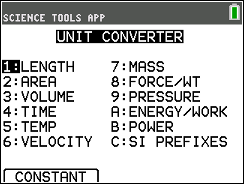
This App provides students the capability to perform unit conversions as well as use the graphing and vector tool, handle constants and conversions, and deal with significant figures.
Before the Activity
During the Activity
Follow the Activity procedures:
Significant Figures Calculator:
- Choose the SIG FIG calculator option
- Enter numbers
- Perform computations
- Check the number of significant figures
Exploring the Vector Calculator:
- Choose Vector Calculator
- Draw a vector
- Input vector's coordinates.
- Select the second vector
- View the resultant vector
After the Activity

Science: Science General: General
6-8
9-12
9-12
30 Minutes
TI Connect™
TI-84 series
Lessons
iPad is a trademark of Apple Inc., registered in the U.S. and other countries.
Vernier EasyData,Vernier EasyLink and Vernier EasyTemp are registered trademarks of Vernier Science Education.
Vernier EasyData,Vernier EasyLink and Vernier EasyTemp are registered trademarks of Vernier Science Education.