
Solution 34513: Creating Strings on the TI-83 Plus, TI-84 Evo and TI-84 Plus Family of Graphing Calculators.
How can I create a string variable on the TI-83 Plus, TI-84 Evo and TI-84 Plus family of graphing calculators?
A string is a sequence of characters enclosed within quotation marks. Characters are the units combined to form a string. Each number, letter, and space is one character. Each instruction or function, such as sin( or tan( is one character. Quotation marks do not count as string characters.
To enter a string on a blank line on the Home screen or in a program:
1) Press [ALPHA] then ["] to indicate the beginning of the string
2) Enter the string text (this may include number, letters, functions, instructions, or spaces)
3) Press [ALPHA] then ["]
4) Press [ENTER]
The TI-83 Plus and TI-84 Plus family of graphing calculators have 10 built-in variables to which strings can be stored. Other variables cannot be used to store strings.
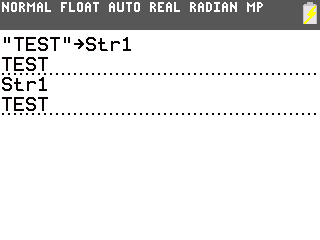
To store a string to a string variable:
1) Press [ALPHA] then ["] to indicate the beginning of the string
2) Enter the string text.
3) Press [ALPHA] then ["] to indicate the end of the string
4) Press the [STO->] key.
5) Press [VARS] to display the VARS menu.
6) Press [7] to select 7:String.
7) Select the string variable from str1 to str0 to which to store the string.
8) Press [ENTER].
Please Note: To display the contents of a string variable on the home screen, select the string variable from the VARS STRING menu, and then press [ENTER].
Please see the guidebooks for additional information.