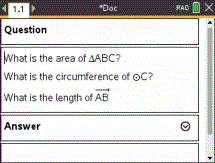
You can use geometric shape symbols to designate selected text as geometric objects, such as an angle, circle, or line segment.
To insert a shape symbol, position the cursor where you want it, and then do the following:
| • | PC: From the Insert menu, click Shapes, and then select the shape to apply. |
| • | Handheld: Press b to display the Notes menu. On the Insert menu, click Shapes, and then select the shape to apply. |