The Notes application lets you create and share text documents using the TI-Nspire™ handheld and computer software. Use Notes to:
| • | Create study notes to reinforce learning, demonstrate your understanding of classroom concepts, and to review for exams. |
| • | Edit collaboratively by assigning different roles to individuals using your document so that any edits appear in a different text format. |
| • | Create and evaluate math expressions. |
| • | Create correctly formatted chemical formulas and equations. |
Adding a Notes Page
| ▶ | To start a new document with a blank Notes page: |
From the main File menu, click New Document, and then click Add Notes.
Handheld: Press c, and select Notes  .
.
| ▶ | To add a Notes page in the current problem of an existing document: |
From the toolbar, click Insert > Notes.
Handheld: Press ~ and select Insert > Notes.
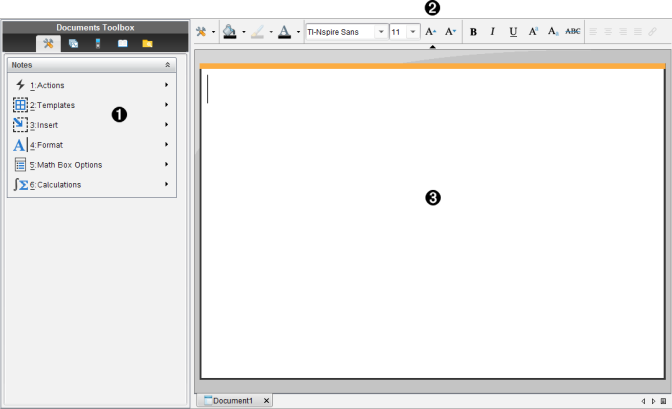
|
À |
Notes tools – Available anytime you are in the Notes work area. |
|
Á |
Text formatting toolbar -- Lets you change size, color, bold, and other text properties. |
|
 |
Notes work area -- The area where you type and format text. |