The Lists & Spreadsheet application gives you a place to work with tabular data. It lets you:
| • | Store numeric data, text, or math expressions. |
| • | Define a table cell in terms of the contents of other cells. |
| • | Define an entire column based on the contents of another column. |
| • | Share columns of data as list variables with other TI-Nspire™ applications. Also share individual cells as variables. |
| • | Work with variables created in the Graphs & Geometry and Calculator applications. |
| • | Collect tables of real-world data from sensors. |
| • | Generate columns of data-based sequences that you define. |
| • | Plot table data using the Data & Statistics application. |
| • | Generate a table of values for a function. |
| • | Copy and paste table data from the Lists & Spreadsheet application to other computer applications, such as TI Connect™ software and Excel® spreadsheet software. |
| • | Perform statistical analysis on lists of data. |
Adding a Lists & Spreadsheet Page
| ▶ | To start a new document with a blank Lists & Spreadsheet page: |
From the main File menu, click New Document, and then click Lists & Spreadsheet.
Handheld: Press c, and select Lists & Spreadsheet  .
.
| ▶ | To add a Lists & Spreadsheet page in the current problem of an existing document: |
From the toolbar, click Insert > Lists & Spreadsheet.
Handheld: Press ~ and select Insert >Lists & Spreadsheet.
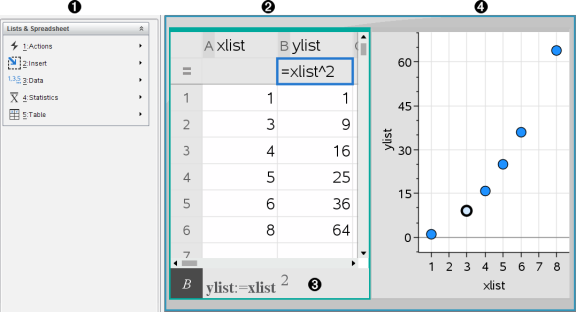
|
À |
Lists & Spreadsheet tools (available when a Lists & Spreadsheet work area is active) |
|
Á |
Sample Lists & Spreadsheet work area |
|
 |
Lists & Spreadsheet entry line |
|
à |
Lists & Spreadsheet data plotted in the Data & Statistics application |