Reviewing Test Mode Restrictions
You can review the restrictions in effect when the app is in Test Mode. You cannot change the restrictions while in the testing session. You must exit Test Mode and re-enter it with new restrictions.
To review the current restrictions:
| 1. | Tap the information icon  in the Test Mode bar. in the Test Mode bar. |
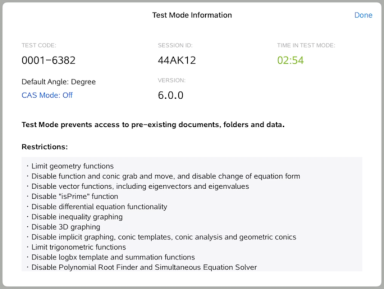
The Test Mode Information dialog opens which displays the following:
| • | Test Code |
| • | Session ID |
| • | Time in Test Mode |
| • | Default Angle |
| • | CAS Mode |
| • | TI-Nspire™ App for iPad® version |
| • | Restrictions |
| 2. | Tap Done to return to the current test session. |