 Opening a Document
| ▶ | Tap the document icon. |
The document opens on the first page.
Adding New Documents
| 1. | Tap New  in the toolbar or tap the Create Document icon if displayed (folder view). in the toolbar or tap the Create Document icon if displayed (folder view). |
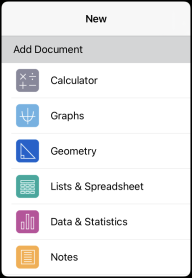
| 2. | Tap an application name. |
A new document opens with the selected application as the first page. The new document is assigned a default name.
Renaming Documents
| 1. | Tap the default name under the document to open the keyboard. |
| 2. | Type a new name, and then tap done. |
The new name is displayed and the keyboard closes.