! " # $
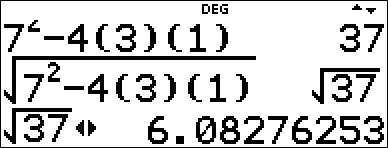
Press ! or " to move the cursor within an expression that you are entering or editing. Press % ! or % " to move the cursor directly to the beginning or end of the expression.
From an expression or edit, # moves the cursor to the history. Pressing < from an input or output in history will paste that expression back to the cursor position on the edit line.
Press % # from the denominator of a fraction in the expressions edit to move the cursor to the history. Pressing < from an input or output in the history will paste that expression to the denominator.
Example
|
7 F U 4 ( 3 ) ( 1 ) < |
|
|
% b # # < < |
|
|
r |
|