此子菜单位于更多模块项下方。
注: 创建使用此模块的新程序时,建议使用图像处理程序类型。这将确保导入所有相关模块。
|
项目 |
说明 |
|---|---|
|
from ti_image import * |
从 ti_image 模块导入所有方法。 |
|
new_image(width,height,(r,g,b)) |
创建具有指定宽度和高度的新图像,以用于 Python 程序。 新图像的颜色由 (r,g,b) 值定义。 |
|
load_image("name") |
加载由“name”指定的图像,以用于 Python 程序。 图像必须是“记事本”或“图形”应用程序中 TNS 文档的一部分。 “名称”提示将显示图像名称(如果先前已命名)或表示其插入顺序的数字。 |
|
copy_image(image) |
创建由“图像”变量指定的图像副本。 |
图像对象的方法
通过输入后跟 . (dot) 的变量名称,使与图像对象相关的其他函数在编辑器和 Shell 中可用。
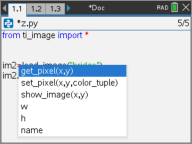
| • | get_pixel(x,y): 获取 (x,y) 坐标对所定义的位置处像素的 (r,g,b) 值。 |
px_val = get_pixel(100,100)
print(px_val)
| • | set_pixel(x,y,color_tuple): 将位置 (x,y) 处的像素设置为 color_tuple 中指定的颜色。 |
set_pixel(100,100,(0,0,255))
将 (100,100) 处的像素设置为 (0,0,255) 颜色。
| • | show_image(x,y): 显示左上角位于位置 (x,y) 处的图像。 |
| • | w, h, name: 获取图像的宽度、高度和名称参数。 |
示例
from ti_image import *
# An image has been previously inserted into the TNS document in a Notes application and named "bridge"
im1=load_image("bridge")
px_val = im1.get_pixel(100,100)
print(px_val)
# Set the pixel at 100,100 to blue (0,0,255)
im1.set_pixel(100,100,(0,0,255))
new_px = im1.get_pixel(100,100)
print(new_px)
# Print the width, height and name of the image
print(im1.w, im1.h, im1.name)