Complete these steps only if you want to delete ALL files and folders on your handheld.
WARNING: This action clears the copy/paste clipboard, clears Scratchpad, and deletes all user-created files and folders from the handheld. You cannot undo this operation. Before proceeding, consider restoring sufficient available storage by deleting only selected data.
| 1. | After making certain you want to clear all files, press c 2 to open the My Documents file browser. |
| 2. | Press b to open the context menu. |
| 3. | Select Delete All. —or— Press C. |
The Delete All dialog box opens.
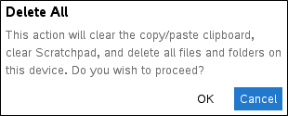
| 4. | Click OK to confirm that you want to clear the handheld storage. |