Using the Calculator Workspace
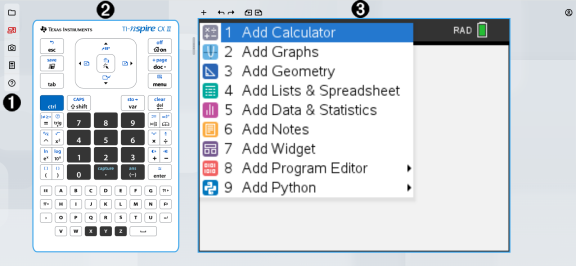
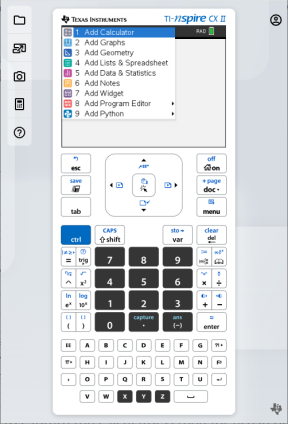
The TI-Nspire™ CX II online calculator workspace has three main areas:
 Function Bar
 Calculator Keypad
 Calculator Workspace
Screen Focus
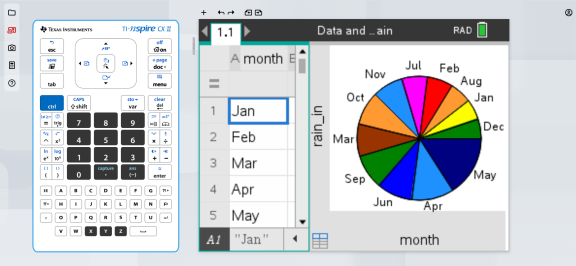
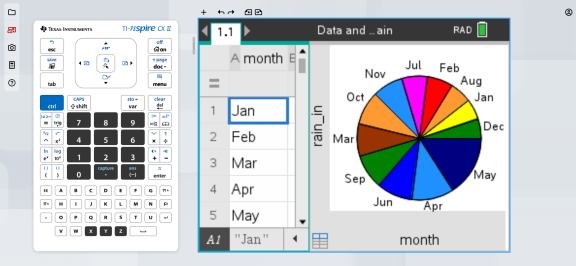
When you are working with the calculator, the area of the screen you were last interacting with is highlighted with a blue outline. Any keystrokes or keyboard shortcuts will only affect that part of the screen, if available.
You can change the focus by clicking on one side or the other.
Focus on the calculator keypad:
Focus on the calculator screen:
Function Bar
|
À |
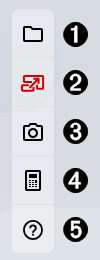
Document menu
See Managing Documents for more information. |
||||||||||||
|
Á |
Large Screen: Allows you to toggle between the default large screen view and the full calculator view.
|
||||||||||||
|
 |
Screen Capture: Allows you to capture the calculator screen for use in other apps. See Capturing the Calculator Screen for more information. |
||||||||||||
|
à |
Connectivity: Launches the TI-Nspire™ CX II Connect app in a new tab where you can connect your TI-Nspire™ CX II graphing calculator to capture screens, transfer .tns files, and update the OS. |
||||||||||||
|
Ä |
Help menu
|
Document Tools

|
À |
Insert: Allows you to insert a problem, page, or app in the document. |
|
Á |
Undo/Redo: Allows you to undo or redo the previous action. |
|
 |
Previous Page/Next Page: Allows you to navigate between pages in your document. |
Resize Bar

You can move the resize bar left or right to dynamically change the size of the keypad and work area to meet your needs.
Account Info and Sign Out

Clicking the Account Info icon  will open a dialog box that displays basic information about your account.
| • | Account Info: Your Texas Instruments account email address/user name. |
| • | Subscription Expiration: The date your Texas Instruments subscription will expire. |
| • | SIGN OUT button: Signing out will disconnect you from any Texas Instrument product your account has access to. |
Click anywhere on the screen other than the SIGN OUT button or press the esc button on your keyboard to return to the calculator workspace.