m o % n % p
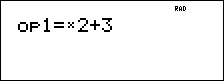
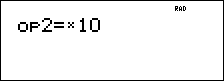
The TI-34 MultiView™ calculator stores two operations, op1 and op2. To store an operation to op1 or op2 and recall it:
| 1. | Press % n or % p. You may have to press - if a previous operation is displayed. |
| 2. | Enter the operation (any combination of numbers, operations, or menu items and their arguments). |
| 3. | Press < to save the operation to memory. |
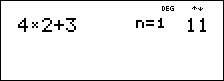
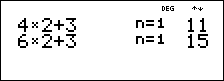
| 4. | m or orecalls and displays the operation on the entry line. The TI-34 MultiView™ calculator automatically calculates the result (without pressing <). |
Examples
|
Set op1 |
% n V 2 T 3 < |
|
|
op1 |
4 m |
|
|
|
6 m |
|
|
Set op2 |
% p V 10 < |
|
|
op2 |
1 o |
|
|
|
o |
|
|
|
o |
|
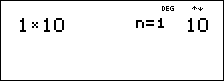
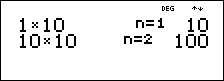
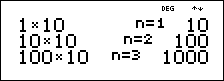
³ Problem
Harry's father will pay him $15 per week if he helps out a few hours at his family's grocery store. Harry would like to save all he earns to buy several of his favorite books and video games. He estimates that he will need to earn $240 to buy everything he would like to have. Create a table of Harry's weekly earnings to see how his savings will grow. How many weeks will Harry need to work to save enough money for his purchases?
|
% n (Press - if necessary to clear a previous operation) T 15 < |
|
|
0 m m m m |
|
|
m m m m |
|
|
m m m m |
|
|
m m m m |
|
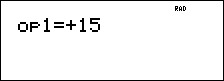
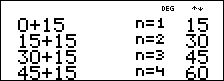
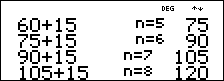
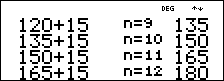
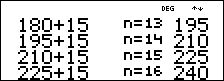
The table of values of Harry's weekly earnings is shown on the screens. From this table, we can read that Harry will have to work 16 weeks to earn $240.