Battery Information
Battery Caution:
|
•
|
Do not ingest battery, Chemical Burn Hazard. |
|
•
|
This product contains a coin or button cell battery. If the coin or button cell battery is swallowed, it can cause severe internal burns in just 2 hours and can lead to death. |
|
•
|
Keep new and used batteries away from children. |
|
•
|
Always completely secure the battery compartment. If the battery compartment does not close securely, stop using the product, remove the batteries, and keep them away from children. |
|
•
|
If you think batteries might have been swallowed or placed inside any part of the body, seek immediate medical attention. |
|
•
|
Call a local poison control center for treatment information. |
|
•
|
Even used batteries may cause severe injury or death. |
|
•
|
Non-rechargeable batteries are not to be recharged. |
|
•
|
Do not force discharge, recharge, disassemble, heat above 140F (60C) or incinerate. Doing so may result in injury due to venting, leakage or explosion resulting in chemical burns. |
|
•
|
Ensure the batteries are installed correctly according to polarity (+ and -). |
|
•
|
Do not mix old and new batteries, different brands or types of batteries, such as alkaline, carbon-zinc or rechargeable batteries. |
|
•
|
Risk of fire or explosion if battery is replaced by an incorrect type. |
|
•
|
Remove and immediately recycle or dispose of batteries from equipment not used for an extended period of time according to local regulations. Do NOT dispose of batteries in household trash or incinerate. |
How to Remove or Replace the Batteries
The TI-30X Plus MathPrint™ calculator uses two 3-volt CR2032 batteries.
|
•
|
Remove the protective cover and turn the calculator face downwards. |
|
•
|
With a small screwdriver, remove the screws from the back of the case. |
|
•
|
From the bottom, carefully separate the front from the back. Be careful not to damage any of the internal parts. |
|
•
|
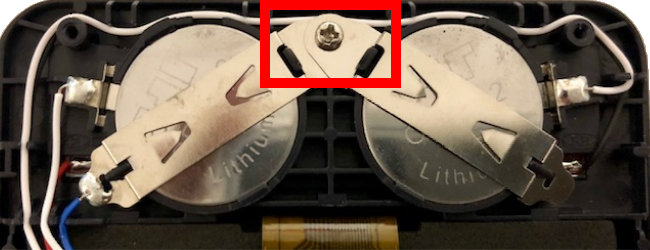
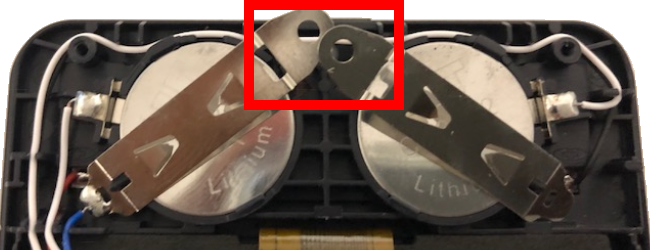
With a small screwdriver, remove the screw on the battery clip and remove the batteries. |
|
•
|
To replace the batteries, check the polarity (+ and -) and slide in the new batteries. Press firmly to snap the new batteries into place and replace the screw in the battery clip. |
Important: When replacing the batteries, avoid any contact with the other components of the calculator.
Dispose of the dead batteries immediately and in accordance with local regulations.
Per CA Regulation 22 CCR 67384.4, the following applies to the button cell batteries in this unit:
Perchlorate Material - Special handling may apply.
See: www.dtsc.ca.gov/hazardouswaste/perchlorate