Adding a Title
When you add a title to a graph, the title is displayed in the View Details area. When you print the graph, the title prints on the graph.
| 1. | Click Graph > Graph Title. |
The Graph Title dialog box opens.
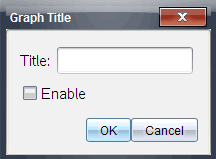
If there are two graphs in the work area, the dialog box has two title options.
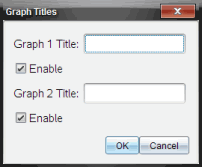
| 2. | Type the name of the graph in the Title field. |
—or—
| a) | Type the name of the first graph in the Graph 1 field. |
| b) | Type the name of the second graph in the Graph 2 field. |
| 3. | Select Enable to show the title. |
Note: Use the Enable option to hide or show the graph title as needed.
| 4. | Click OK. |
The title is shown.