 Exploring the Documents Toolbox
When a PublishView™ document is active, the Documents Toolbox contains tools needed for working with PublishView™ documents. You can add TI‑Nspire™ applications to a problem, insert parts of existing TI‑Nspire™ documents into a problem, and add PublishView™ objects.
The Documents Toolbox opens when you create a new PublishView™ document or open an existing PublishView™ document. When working in a PublishView™ document, Page Sorter and TI‑SmartView™ emulator are not available.
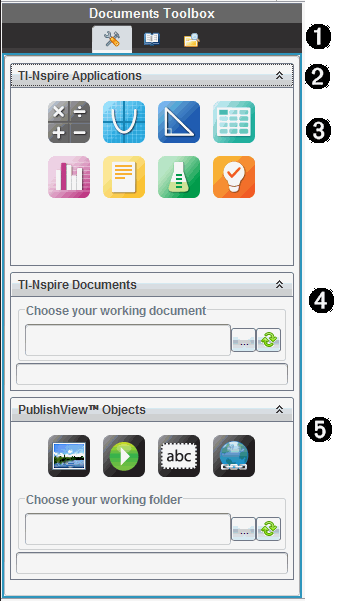
|
À |
In a PublishView™ document:
Note: For more information, see Using the Documents Workspace. |
|||||||||
|
Á |
Click |
|||||||||
|
 |
TI‑Nspire™ applications. Move an icon to a problem to insert an application:
|
|||||||||
|
à |
TI‑Nspire™ Documents. Use this tool to locate and insert existing TI‑Nspire™ documents (.tns files) into a problem. |
|||||||||
|
Ä |
PublishView™ Objects. Use this tool to move the following objects into a problem:
|
 to open the application menu and tools needed to work with TI‑Nspire™ applications and PublishView™ objects.
 to open the Utilities panel where you can access Math Templates, Symbols, the Catalog, Math Operators, and Libraries.
 to open Content Explorer.
 to collapse a pane containing a menu. Click
  to expand a pane.
  Calculator
 Graph
Graph Geometry
 Lists & Spreadsheet
 Data & Statistics
 Notes
Notes Vernier DataQuest™
 Question (Available in TI‑Nspire™ Teacher Software, TI‑Nspire™ Navigator™ Teacher Software, and TI‑Nspire™ Navigator™ NC Teacher Software).
 Image
Image Video
Video Text box
 Hyperlink