

Working with Math Boxes
Inserting a Math Box
| 1. | Tap the Notes work area to place your cursor where you want to insert the math box. |
| 2. | Tap Tools  and go to Insert. and go to Insert. |
| 3. | Tap Math Box. |

| 4. | Type the expression inside the math box. You can also insert a function, command, symbol or expression template by tapping Utilities  to access Catalog, Symbols, Math Operators, and Libraries. to access Catalog, Symbols, Math Operators, and Libraries. |
| 5. | Tap ENTER to evaluate the expression. |
Converting Selected Items to Math Boxes
| 1. | Select the text, or combination of text and existing math boxes, that you want to evaluate. |
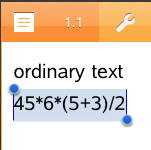
| 2. | Tap Tools and go to Insert. |

| 3. | Tap Convert to Math Box. |