Exiting Press-to-Test Mode
Exiting Press-to-Test clears all data and files created while in Press-to-Test mode. All files and system settings are restored to what they were before Press-to-Test was enabled on the handheld.
|
•
|
All documents created during the Press-to-Test session are deleted. If you re-enter Press-to-Test mode, Press-to-Test folder is empty. |
|
•
|
If a document was open before you entered Press-to-Test mode, that document is restored to the same view (My Documents, Page sorter, or page view) when you exit Press-to-Test mode. If the open document contained unsaved changes, the restored open document is still unsaved. |
|
•
|
If there is no open document, the handheld displays My Documents. |
Exiting Press-to-Test on One Handheld
If Press-to-Test is enabled on a handheld, you can connect the handheld to any other TI‑Nspire™ handheld that does not have Press-to-Test installed to remove it from the enabled handheld.
Note: Handhelds can be mixed. You can connect a TI‑Nspire™ CX handheld to a TI‑Nspire™ handheld or connect a TI‑Nspire™ CAS handheld to a handheld that does not have CAS.
|
1.
|
Connect the Press-to-Test enabled handheld to another TI‑Nspire™ handheld using the unit-to-unit connection cable. |
|
2.
|
Make sure both handhelds are turned on. |
|
3.
|
On the handheld with Press-to-Test enabled, select and press ~ to access the Documents menu. |
On a Clickpad: Press w, and then select , press / c.
|
4.
|
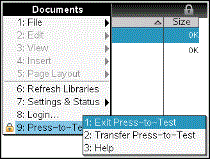
Select . This menu option is active only while in Press-to-Test mode. |
|
•
|
If the handheld is connected to another handheld, the handheld exits Press-to-Test mode and reboots in normal mode. If both handhelds are in Press-to-Test mode, both handhelds exit Press-to-Test. |
|
•
|
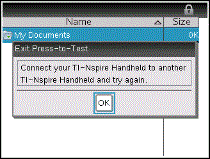
If the handheld is not connected properly, the following message appears: |
|
•
|
The handheld does not exit Press-to-Test mode until it reboots. If you disconnect the cable during the transfer, your handheld remains in Press-to-Test mode. |
Note: You can also exit Press-to-Test mode by successfully receiving an OS upgrade (from handheld or computer software). Receiving the same OS will not cause the handheld to exit Press-to-Test.