to show the unit conversions.
A list of pre-defined constants and measurement units is available in the Catalog. You can also create your own units.
Note: If you know a unit’s name, you can type the unit directly. For example, you can type _qt to specify quarts. To type the underscore symbol on the handheld, press / _.
You can convert a value between any two units within the same category (such as length).
Example: Using the Catalog, convert 12 meters to feet. The desired expression is 12·_m¢_ft.
| 1. | Type 12 on the entry line. |
| 2. | On the Utilities tab, click to show the unit conversions. |
Handheld: Press k 3.
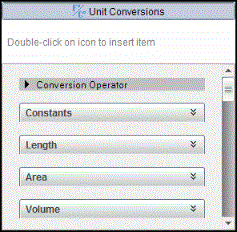
| 3. | Click the Length category to expand the list of pre-defined length units. |
Handheld: Scroll to the Length category, and press ·.
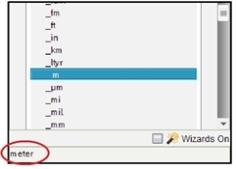
| 4. | Scroll to meter. |
Handheld: Scroll to _m (noting the meter hint in the Help window).
| 5. | Press · to paste _m to the entry line. |

| 6. | Click the Conversion Operator (¢) at the top of the Units list, and press · to paste it to the entry line. |

| 7. | Select _ft from the Length category, and press ·. |

| 8. | Press · to evaluate the expression. |

As with the pre-defined units, user-defined unit names must begin with an underscore symbol.
Example: Using the pre-defined units _ft and _min, define a unit named _fpm that lets you enter velocity values in feet per minute and convert velocity results to feet per minute.

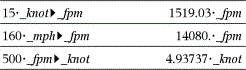
Now you can use the new velocity unit _fpm.