Entering a Number in Scientific Notation
|
1.
|
Enter the part of the number that precedes the exponent. This value can be an expression. |
|
2.
|
Press y D. â is pasted to the cursor location. |
|
3.
|
Enter the exponent, which can be one or two digits. |
Notes:
|
•
|
If the exponent is negative, press k, and then enter the exponent. |
|
•
|
â stands for "x10" and the calculator interprets the entire number as (123.45 x 10⁻²) as if it was entered with parentheses. |
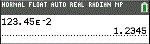
When you enter a number in scientific notation, the TI-84 Plus CE does not automatically display answers in scientific or engineering notation. The mode settings and the size of the number determine the display format.