此子功能表位於更多模組下。
注意: 在建立使用此模組的新程式時,建議使用圖片處理程式類型。如此將可確保所有相關模組皆已匯入。
|
項目 |
說明 |
|---|---|
|
from ti_image import * |
從 ti_image 模組匯入所有方法。 |
|
new_image(width,height,(r,g,b)) |
建立用於 Python 程式,且包含指定寬度與高度的新圖片。 新圖片的顏色由 (r,g,b) 值定義。 |
|
load_image("name") |
載入用於 Python 程式,由「名稱」指定的圖片。 圖片必須是「筆記」或「函數繪圖」應用程式中的 TNS 文件的一部分。 「name」提示將會顯示圖片名稱(如果先前已經將其命名)或是指示其插入順序的數字。 |
|
copy_image(image) |
建立由「image」變數指定的圖片副本。 |
圖片物件的方法
如需有關圖片物件的其他函數,可以輸入變數名稱,後面加上「.」(點號),即可在編輯器以及 Shell 中使用。
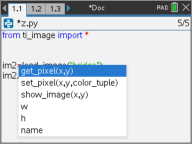
| • | get_pixel(x,y): 在 (x,y) 平面座標值所定義的位置取得像素 (r,g,b) 值。 |
px_val = get_pixel(100,100)
print(px_val)
| • | set_pixel(x,y,color_tuple): 將位置 (x,y) 的像素設定為 color_tuple 中指定的色彩。 |
set_pixel(100,100,(0,0,255))
將 (100,100) 的像素設定為 (0,0,255) 色。
| • | show_image(x,y): 顯示圖片,其左上角的位置在 (x,y)。 |
| • | w, h, name: 設定圖片的寬度、高度以及名稱參數。 |
範例
from ti_image import *
# An image has been previously inserted into the TNS document in a Notes application and named "bridge"
im1=load_image("bridge")
px_val = im1.get_pixel(100,100)
print(px_val)
# Set the pixel at 100,100 to blue (0,0,255)
im1.set_pixel(100,100,(0,0,255))
new_px = im1.get_pixel(100,100)
print(new_px)
# Print the width, height and name of the image
print(im1.w, im1.h, im1.name)