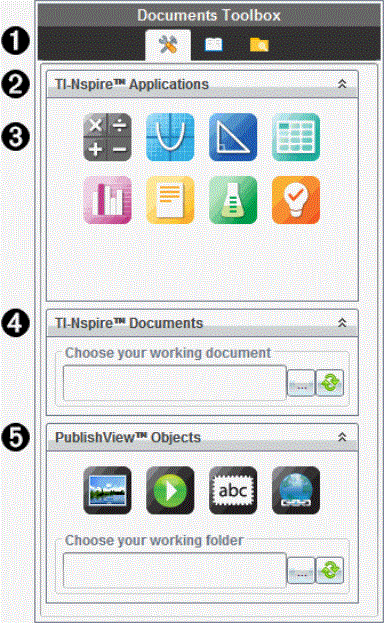
When a PublishView™ document is active, the Documents Toolbox contains tools needed for working with PublishView™ documents. You can add TI-Nspire™ applications to a problem, insert parts of existing TI-Nspire™ documents into a problem, and add PublishView™ objects.
The Documents Toolbox opens when you create a new PublishView™ document or open an existing PublishView™ document. When working in a PublishView™ document, Page Sorter and TI-SmartView™ emulator are not available.
|
À
|
In a PublishView™ document:
|
•
|
Click  to open the application menu and tools needed to work with TI-Nspire™ applications and PublishView™ objects. to open the application menu and tools needed to work with TI-Nspire™ applications and PublishView™ objects. |
|
•
|
Click  to open the Utilities panel where you can access Math Templates, Symbols, the Catalog, Math Operators, and Libraries. to open the Utilities panel where you can access Math Templates, Symbols, the Catalog, Math Operators, and Libraries. |
|
•
|
Click  to open Content Explorer. to open Content Explorer. |
Note: For more information, see Using the Documents Workspace.
|
|
Á
|
Click  to collapse a pane containing a menu. Click to collapse a pane containing a menu. Click  to expand a pane. to expand a pane.
|
|
Â
|
TI-Nspire™ applications. Move an icon to a problem to insert an application:
 Calculator Calculator
 Graph Graph
 Geometry Geometry
 Lists & Spreadsheet Lists & Spreadsheet
 Data & Statistics Data & Statistics
 Notes Notes
 Vernier DataQuest™ Vernier DataQuest™
 Question (Available in TI-Nspire™ CX Premium Teacher Software). Question (Available in TI-Nspire™ CX Premium Teacher Software).
|
|
Ã
|
. Use this tool to locate and insert existing TI-Nspire™ documents (.tns files) into a problem.
|
|
Ä
|
. Use this tool to move the following objects into a problem:
 Image Image
 Video Video
 Text box Text box
 Hyperlink Hyperlink
|
 Exploring the Documents Toolbox