As you add problems and pages to a document, you can take advantage of features for managing the parts.
|
À |
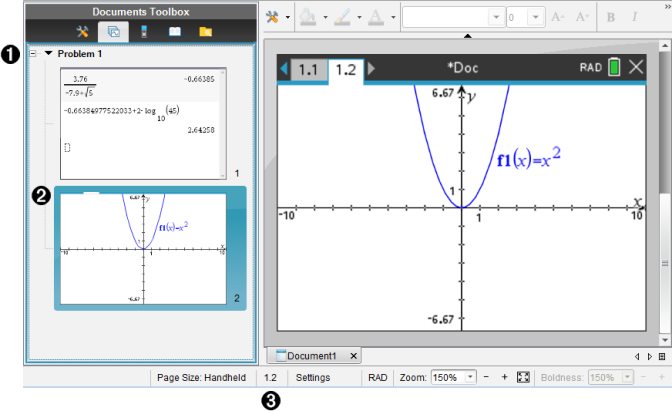
Page Sorter. Lists the problems you have inserted in your document and shows thumbnail images of the pages in each problem. The Page Sorter lets you rearrange, copy, and move both problems and pages. It also lets you rename problems. |
|
Á |
Active page. Indicates the current page by highlighting its thumbnail image. Thumbnails let you easily scan the pages in a document and select a specific page to work with. |
|
 |
Problem/Page counter. Displays the problem number and page number of the currently selected page. |
 Selecting Pages
 or Next Page
  button on the main toolbar.
 in the Documents Toolbox, and then click the thumbnail of the page you want to work with.