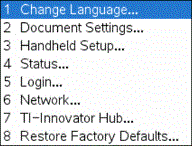
Use the options on the Settings menu to change or view the following settings:
| • | Change language |
| • | Settings (Document and Graphs & Geometry) |
| - | Define or restore settings for open documents and the Scratchpad |
| - | Define or restore default settings for the handheld |
| • | Handheld Setup |
| • | Status |
| • | Login |
Note: Not all options are accessible at all times. Options that are unavailable are disabled.
Opening the Settings Menu
| ▶ | From the Home screen, press 5or use the Touchpad to select Settings. |
The Settings menu opens.