You are here: TI-30X Pro MathPrint™ Scientific Calculator > Math Tools > Complex Numbers

Complex Numbers

% ˆ

The calculator performs the following complex number calculations:

• Addition, subtraction, multiplication and division
• Argument and absolute value calculations
• Reciprocal, square and cube calculations
• Complex Conjugate number calculations

Setting the Complex Format

Set the calculator to DEC mode when computing with complex numbers.

q $ $ $ Selects the REAL menu. Use ! and o" to scroll with in the REAL menu to highlight the desired complex results format a+bi, or r±q, and press <.

REAL, a+bi, or r±q set the format of complex number results.

a+bi rectangular complex results

r±q polar complex results

Notes:

• Complex results are not displayed unless complex numbers are entered.
• To access i on the keypad, use the multi-tap key g.
• Variables x, y, z, t, a, b, c, and d are real or complex.
• Complex numbers can be stored.
• Complex numbers are not allowed in data, matrix, vector, and where complex arguments are not valid. A function can be defined with a complex number expression and will calculate on the home screen and not in table.
• For conj(, real(, and imag(, the argument can be in either rectangular or polar form. The output for conj( is determined by the mode setting.
• The output for real( and imag( are real numbers.
• Set mode to DEGREE or RADIAN depending on the angle measure needed.

Complex Menu

Description

1:±

± (polar angle character)

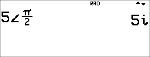
Lets you paste the polar representation of a complex number (such as 5±p).

2:polar angle

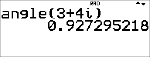
Returns the polar angle of a complex number.

Syntax: angle(value)

3:magnitude

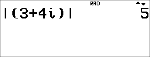
Returns the magnitude (modulus) of a complex number.

Syntax: abs(value) (or |þ| in MathPrint™ mode)

4:4r±q

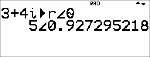
Displays a complex result in polar form. Valid only at the end of an expression.

5:4a+bi

Displays a complex result in rectangular form. Valid only at the end of an expression.

6:conjugate

Returns the conjugate of a complex number.

Syntax: conj(value)

7:real

Returns the real part of a complex number.

Syntax: real(value)

8:imaginary

Returns the imaginary (non-real) part of a complex number.

Syntax: imag(value)

Examples (set mode to RADIAN)

Polar angle character:

±

- 5 % ˆ < g P 2 <

Polar angle:

angle(

- % ˆ $

< 3 T 4

g g g ) <

Magnitude:

abs(

- % ˆ 3

( 3 T 4 g g g ) <

4r±q

-

3 T 4 g g g

% ˆ 4 <

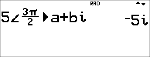
4a+bi

-

5 % ˆ <

3 g P 2 "

% ˆ 5 <

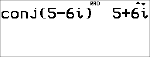
Conjugate:

conj(

-

% ˆ 6

5 U 6 g g g )

<

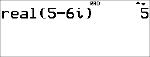
Real:

real(

-

% ˆ 7

5 U 6 g g g )

<