Memory and Stored Variables
z L % h % {
The TI-30X Pro MathPrint™ calculator has 8 memory variables—, , , , , , , and . You can store the following to a memory variable:
|
•
|
real or complex numbers |
|
•
|
calculations from various applications such as Distributions |
|
•
|
data editor cell values (stored from the edit line) |
Features of the calculator that use variables will use the values that you store.
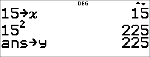
L lets you store values to variables. Press L to store a variable, and press z to select the variable to store. Press < to store the value in the selected variable. If this variable already has a value, that value is replaced by the new one.
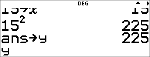
z is a multi-tap key that cycles through the variable names , , , , , , , and . You can also use z to recall the stored values for these variables. The name of the variable is entered in the current entry, but the value assigned to the variable is used to evaluate the expression. To enter two or more variables in succession, press " after each.
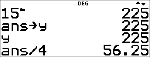
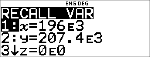
% h recalls the values of variables. Press % h to display a menu of variables and their stored values. Select the variable you want to recall and press <. The value assigned to the variable is inserted into the current entry and used to evaluate the expression.
% { clears variable values. Press % { and select to clear all variable values. Any computed Stat Vars will no longer be available in the Stat Vars menu. Recompute statistic features as needed.
Examples
|
Start with clear screen
|
% s -
|

|
|
Clear Var
|
% {
(Selects )
|

|
|
Store
|
L z
|

|
|
|
<
|
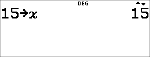
|
|
Recall
|
% h
|
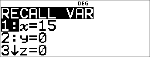
|
|
|
< F <
|
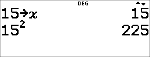
|
|
|
L z z
|
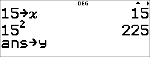
|
|
|
<
|
|
|
|
z z
|
|
|
|
< W <
|
|
³ Problem
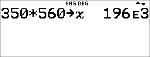
In a gravel quarry, two new excavations have been opened. The first one measures 350 metres by 560 metres, the second one measures 340 metres by 610 metres. What volume of gravel does the company need to extract from each excavation to reach a depth of 150 metres? To reach 210 metres? Display the results in engineering notation.
|
q $ " " < -
V L z <
|
|
|
V L z z <
|
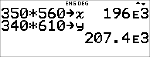
|
|
-
V % h
|
|
|
< <
|
|
|
-
V % h < <
|
|
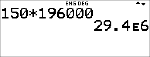
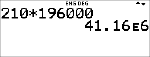
For the first excavation, the company needs to extract 29.4 million cubic metres to reach a depth of 150 metres, and extract 41.16 million cubic metres to reach a depth of 210 metres.
|
-
V z z <
|
|
|
V z z <
|
|
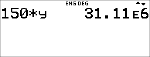
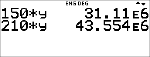
For the second excavation, the company needs to extract 31.11 million cubic metres to reach a depth of 150 metres, and extract 43.554 million cubic metres to reach a depth of 210 metres.