You can use your computer keyboard to press a key instead of pressing that key on the
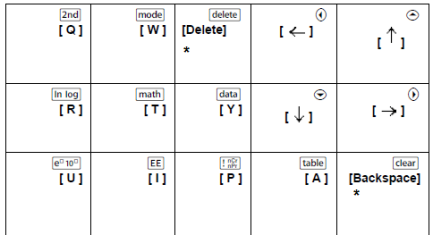
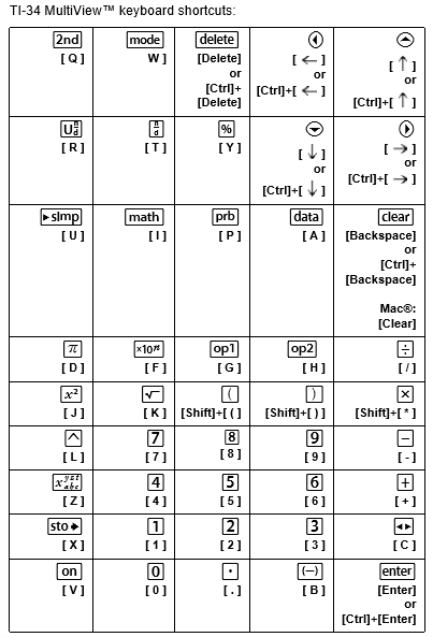
To press an emulator key using your computer keyboard, use the table below to find the computer keyboard key associated with the emulator key.
| • | TI-30X Pro MathPrint™ or TI-30X Plus MathPrint™ keyboard shortcuts |
| • | TI-30XS-30XB MultiView™ keyboard shortcuts |
| • | TI-34 MultiView™ keyboard shortcuts |
Example: To display the mode screen in the emulator, press [W] on the computer keyboard as shown in the table below.
TI-30X Pro MathPrint™ keyboard shortcuts:
TI-30X Plus MathPrint™ keyboard shortcuts:
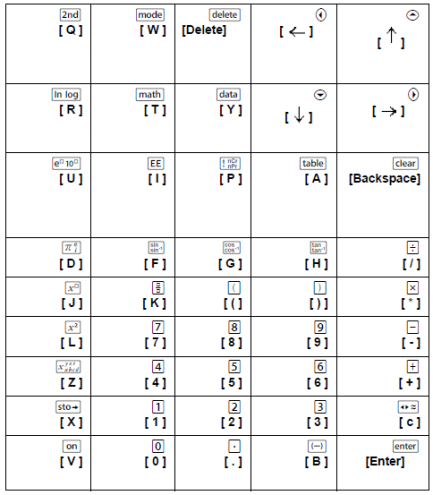
*Note:
On the MAC computer keyboard,
| - | Press [Delete] for J. |
| - | Press [Backspace] for -. |
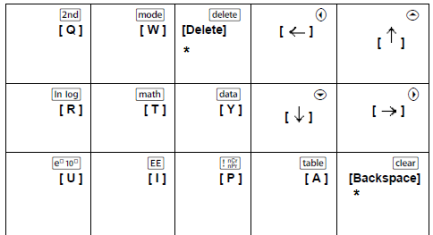
Example: To display the mode screen in the emulator, press [W] on the computer keyboard as shown in the table below.
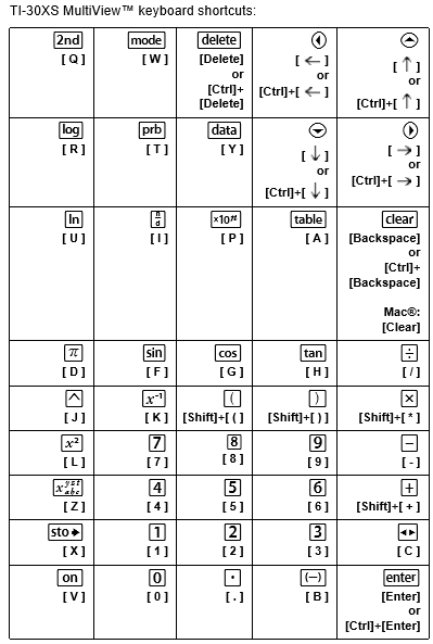
*Note:
On the MAC computer keyboard,
| - | Press [Delete] for J. |
| - | Press [Backspace] for -. |
Example: To display the mode screen in the emulator, press [W] on the computer keyboard as shown in the table below.

*Note:
On the MAC computer keyboard,
| - | Press [Delete] for J. |
| - | Press [Backspace] for -. |