Presentation Tools – View It
From smaller classrooms to larger auditoriums, TI's presentation tools are designed to build student confidence in math and science, increase comprehension and retention, and maximize your school's technology investment.
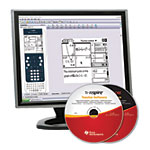
TI-Nspire™ and TI-Nspire CAS Teacher Software
In addition to all the features available with TI-Nspire and TI-Nspire CAS Student Software, TI-Nspire Teacher Software and TI-Nspire CAS Teacher Software include:
- Built-in TI-SmartView™ emulator featuring a resizable emulated handheld view that can be used in classroom presentations. The TI-SmartView emulator displays the TI-Nspire handheld in both a handheld view or handheld with side screen view
- Question Application allowing educators to create questions such as open response, custom choice, true/false, yes/no, right/wrong, agree/disagree, always/sometimes/never and strongly agree/strongly disagree
The Teacher Software with a handheld emulator and enhanced document editing improves the classroom learning experience and provides a versatility in lesson building.
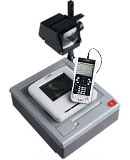
Overhead projector not included.
TI-Nspire ViewScreen™ panel
When projecting from a standard overhead, the TI-Nspire ViewScreen panel is required for any connected TI-Nspire handheld (with TI-Nspire Keypad or TI-84 Plus Keypad* snapped in) or TI-Nspire CAS handheld.
The TI-Nspire ViewScreen panel also has five times the resolution of the ViewScreen panel used for TI graphing calculators.
The TI-Nspire Viewscreen Panel can also be used with ELMO projection devices
*The TI-84 Plus Keypad is not included or compatible with the TI-Nspire CAS handheld and may not be included with TI-Nspire handheld when sold outside of North America.