Preparing TI-Rover BT
| • | TI-Rover BT is compatible with TI-84 Evo with OS 7.1 or higher. |
| • | Preparing TI-Rover BT |
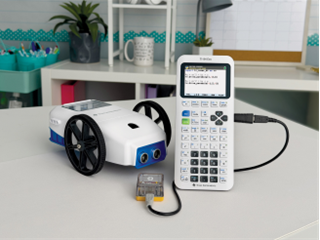
| – | TI-Rover BT comes with all of the necessary equipment to use with a compatible calculator out of the box. You should have (1) TI-Rover BT, (1) TI Bluetooth® Adapter with cable (1) USB A to USB C cable for charging and TI-Rover BT updates, and (1) USB-mini to USB C adapter to make the TI Bluetooth® Adapter compatible with a TI-84 Evo's USB C port. |
| • | Download the Bluetooth® configuration file found at www.education.ti.com/RoverBT. This file is used to pair your TI-Rover BT to the TI Bluetooth® adapter connected to your calculator. The file is titled, CFGRVRBT |
| • | To get the file onto your calculator, use the free online connectivity application at connectevo.ti.com and then follow the prompts. |