Available commands (in the Python editor)
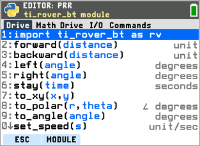
Drive
|
Drive |
Syntax |
Description |
|
import ti_rover_bt as rv |
import ti_rover_bt as rv |
Import statement required to operate TI-Rover BT |
|
forward(distance) |
rv.forward(|) |
Rover moves forward a given distance Distance if specified is in centimeters. Default: 1 centimeter Range: -1000 to 1000 A negative number results in a backward motion Note: optionally, you can add a value for speed (max = 100 cm/s) and acceleration (max = 50 cm/s) to the rv.forward or rv.backward(distance value, speed value, acceleration value) |
|
backward(distance) |
rv.backward(|) |
Rover moves backward a given distance Distance if specified is in centimeters. Default: 1 centimeter Range: -1000 to 1000 A negative number results in a forward motion |
|
left(angle) degrees |
rv.left(|) |
Turn Rover to the left at specified angle. The turn will execute as a spin motion. Default turn is 90 degrees. Range: -1800 to 1800 Negative value means a 'right' turn |
|
right(angle) degrees |
rv.right(|) |
Turn Rover to the right at specified angle. The turn will execute as a spin motion. Default turn is 90 degrees. Range: -1800 to 1800 Negative value means a 'left' turn |
|
stay(time) seconds |
rv.stay(|) |
Rover stays in place for an optionally specified time. Default time is 30.0 seconds. Range: (0, 100) The motors should stay engaged during the stay() so there's no unexpected movement for the next move command. |
|
to_xy(x,y) |
rv.to_xy(|,) |
Moves Rover from current grid location to the specified grid location (x,y). |
|
to_polar(r,theta) degrees |
rv.to_polar(|,) |
Moves Rover from current grid location to the specified grid location (r,theta). Radius r is in default grid units. Angle theta is in default degrees. |
|
to_angle(angle) degrees |
rv.to_angle(|) |
Spins Rover to the specified angle from current heading. |
|
set_speed(unit/sec) |
rv.set_speed(|) |
Changes the default speed (40 cm/sec) Range: (1,100) cm/sec |
|
set_acceleration(unit/sec2) or set_accel |
rv.set_acceleration(|) |
Changes the default acceleration (10 cm/sec/sec) Range: (0,50) cm/sec2 |
|
forward_time(time) |
rv.forward_time(|) |
Rover moves forward at default speed for given time |
|
backward_time(time) |
rv.backward_time(|) |
Rover moves backward at default speed for given time |
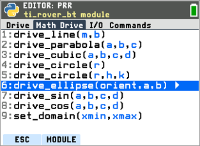
Math Drive
|
Math Drive |
Syntax |
Description |
|
drive_line(m,b) |
# y = mx + b rv.drive_line(|,) |
| indicates the cursor position - at the location for the first argument |
|
drive_parabola(a,b,c) |
# y = ax^2 + bx + c rv.drive_parabola(|, ,) |
| indicates the cursor position - at the location for the first argument |
|
drive_cubic(a,b,c,d) |
# y = ax^3 + bx^2 + cx + d rv.drive_cubic(|, , , ) |
| indicates the cursor position - at the location for the first argument |
|
drive_circle (r) |
# r = radius rv.drive_circle(|) |
r = radius - starting point in the bottom of the circle | indicates the cursor position - at the location for the first argument |
|
drive_circle(r,h,k) |
# (x-h)^2 + (y-k)^2 = r^2 rv.drive_circle(|,,) |
| indicates the cursor position - at the location for the first argument RoverBT will start the movement/drawing from the bottom of the circle |
|
drive_ellipse(orientation, a, b) |
# a = major axis, b = minor axis rv.drive_ellipse(orient,,) |
a = major axis, b = minor axis orientation - Options: horizontal, vertical RoverBT will start the movement/drawing from the bottom of the ellipse |
|
drive_sin(a,b,c,d) |
# a*sin(b(x-c)) + d rv.drive_sin(|, , ,) |
a*sin(b(x-c)) + d | indicates the cursor position - at the location for the first argument Note: Values that cause extremely acute movements will likely result in an error |
|
drive_cos(a,b,c,d) |
# a*cos(b(x-c)) + d rv.drive_cos(|, , ,) |
a*cos(b(x-c)) + d | indicates the cursor position - at the location for the first argument Note: Values that cause extremely acute movements will likely result in an error |
|
set_domain(xmin, xmax) |
# default (0,10) rv.set_domain(|, ) |
default (0,10) | indicates the cursor position - at the location for the first argument This applies to line, parabola, sin and cos functions xmin range: (-20, 20) xmax range: (-20, 20) Values outside this range will trigger an exception |
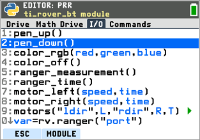
I/O
|
I/O |
Syntax |
Description |
|
pen_up() |
rv.pen_up() |
Moves the pen up. If the pen is already up, it will stay up. |
|
pen_down() |
rv.pen_down() |
Sets the pen down. If pen is already down, it will stay down. |
|
color_rgb(red,green,blue) |
#rv.color_rgb rv.color_rgb(I,,) |
Sets the RGB LED output to the specified r,g,b values, with each value between 0 to 255. |
|
color_off() |
rv.color_off() |
Turns off the RGB LED |
|
ranger_measurement() |
rv.ranger_measurement() |
Reads the ultrasonic distance sensor on the front, returning the current distance in meters. If no reading is possible (ex. object is too far away), a value of 10 meters is returned. Returned values are rounded to 3 decimal places. |
|
ranger_time() |
rv.ranger_time() |
Returns the time of flight out and back for the ultrasonic echo. Time is returned in seconds. If no reading is possible, returned value is 10 seconds. |
|
motor_left(speed,time) |
#rv.motor_left rv.motor_left(I,) |
Speed is specified in "cm per second". |
|
motor_right(speed,time) |
#rv.motor_right rv.motor_right(I,) |
Speed is specified in "cm per second". |
|
motors("ldir", left_val, "rdir", right_val, time) |
#rv.motors("ldir",L,"rdir",R,T)> |
ldir(left direction), rdir(right direction) is specified thorugh an argument helper with "cw" (clockwise) and "ccw" (counter clockwise) as the options. Speed is specified in "cm per second". |
|
Ranger_ext |
|
Argument helper options: |
|
var=rv.ranger("port") |
|=rv.ranger(" ") |
Port 1, Port 2 |
|
var.measurement() |
|.measurement() |
|
|
var.measurement_time() |
|.measurement_time() |
|
|
Digital In | Out |
|
Argument helper options: |
|
var=rv.digital("port") |
|=rv.digital("port#") |
Port1, Port2 |
|
var=rv.led("port") |
|=rv.led("") |
|
|
var.measurement() |
|.measurement() |
|
|
var.set(val) |
|.set() |
set: range (0,1) |
|
var.get() |
|.get() |
get: returns 0 or 1 |
|
var.off() |
|.off() |
|
|
var.on() |
|.on() |
|
|
var.blink(freq,time) |
|.blink(,) |
blink: should be in Hz and stop after time in seconds |
|
var.toggle(freq,time) |
|.toggle(,) |
toggle: should be in Hz and stop after time in seconds |
|
var.pwm(duty,freq,time) |
|,pwm(,,) |
pwm: should be in Hz and duty is in percent and should stop after time in seconds |
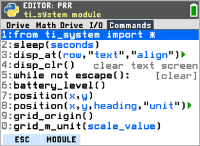
Commands
|
Commands |
Syntax |
Description |
|
from ti_system import * |
from ti_system import * |
This comes from the ti_system module menu and will use the same strings from there |
|
sleep(seconds) |
sleep(seconds) |
This comes from the ti_system module menu and will use the same strings from there |
|
disp_at(row, "text", "align") |
disp_at(I,"","") |
This comes from the ti_system module menu and will use the same strings from there |
|
disp_clr() |
disp_clr() |
This comes from the ti_system module menu and will use the same strings from there |
|
while not escape(): |
while not escape(): |
This comes from the ti_system module menu and will use the same strings from there |
|
battery_level() |
var = rv.battery_level() |
Returns a number between 0 and 100 [Clear] key will break the loop |
|
position(x,y) |
rv.position(|,) |
Identifies Rovers current x and y coordinate position |
|
position(x,y,heading,"unit") |
# rv.position(x,y,heading,"unit") rv.position(|,,,"") |
"unit" will be the existing argument helper with 1. degrees 2. radians 3. grads as options |
|
grid_origin() |
rv.grid_origin() |
Sets the virtual grid origin of the TI-Rover to (0,0) without moving the TI-Rover. |
|
grid_m_unit(scale_value) |
rv.grid_m_unit(|) |
Sets the virtual grid spacing in meters per unit (m/unit) to the value given. 0.01 is the default m/unit and translates to 1 unit = 100 mm or 10 cm or 1 dm or 0.1 m. The range of valid scale_value is from 0.01 to 10.0. |
If you'd like to learn more about the Python Editor and programming options beyond TI-Rover BT go to https://education.ti.com/en/product-resources/eguides/eguide-84-evo/python