%
The calculator performs the following complex number calculations:
| • | Addition, subtraction, multiplication, and division |
| • | Argument and absolute value calculations |
| • | Reciprocal, square, and cube calculations |
| • | Complex Conjugate number calculations |
Setting the Complex Format
Set the calculator to DEC mode when computing with complex numbers.
q $ $ $ Selects the REAL menu. Use ! and " to scroll with in the REAL menu to highlight the desired complex results format a+bi and press <.
REAL or a+bi.
a+bi rectangular complex results
Notes:
| • | Complex results are not displayed unless complex numbers are entered. |
| • | To access i on the keypad, use the multi-tap key g. |
| • | Variables x, y, z, t, a, b, c, and d are real or complex. |
| • | Complex numbers can be stored. |
| • | For conj(, real(, and imag(, the argument can be in either rectangular or polar form. The output for conj( is determined by the mode setting. |
| • | The output for real( and imag( are real numbers. |
| • | Set mode to DEGREE or RADIAN depending on the angle measure needed. |
|
Complex Menu |
Description |
|
1:conjugate |
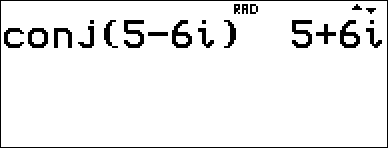
Returns the conjugate of a complex number. Syntax: conj(value) |
|
2:real |
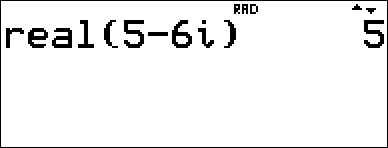
Returns the real part of a complex number. Syntax: real(value) |
|
3:imaginary |
Returns the imaginary (nonreal) part of a complex number. Syntax: imag(value) |
Examples (set mode to RADIAN)
|
Conjugate: conj( |
- % 1 5 U 6 g g g ) < |
|
|
Real: real( |
- % 2 5 U 6 g g g ) < |
|
|
Imaginary: imag( |
- % 3 5 U 6 g g g ) < |