Working with Probability
You can find probability features in the » PROB submenu.
Many probability features have Stat Wizards to help you enter the syntax.
Example:
To generate a set of five random integers between 10 and 25 (inclusive):
|
1.
|
Press », then press ~ until you highlight . |
|
2.
|
Press † until you highlight , then [enter]. |
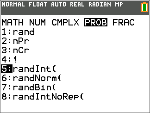
|
3.
|
Enter the lower integer, then [enter]. |
|
4.
|
Enter the upper integer, then [enter]. |
|
5.
|
Enter the number of integers (), then [enter]. |
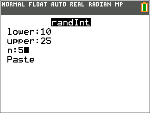
|
6.
|
Press [enter] to Paste. |
|
7.
|
Press [enter] again to see the random set of integers. |
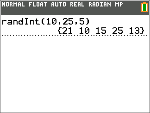
Note:
|
•
|
With each rand execution, the TI-84 Plus CE Python generates the same random-number sequence for a given seed value. The TI-84 Plus CE Python factory-set seed value for rand is 0. To generate a different random-number sequence, store any nonzero seed value to rand. To restore the factory-set seed value, store 0 to rand, or reset the defaults by going to y L . |
|
•
|
The seed value also affects , , and instructions. |