Finding Days between Dates/Defining Payment Method
dbd(
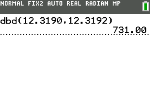
Use the date function dbd( (menu item D) to calculate the number of days between two dates using the actual-day-count method. date1 and date2 can be numbers or lists of numbers within the range of the dates on the standard calendar.
Note: Dates must be between the years 1950 through 2049.
dbd(date1,date2)
You can enter date1 and date2 in either of two formats.
| • | MM.DDYY (United States) |
| • | DDMM.YY (Europe) |
The decimal placement differentiates the date formats.
Defining the Payment Method
Pmt_End and Pmt_Bgn (menu items E and F) specify a transaction as an ordinary annuity or an annuity due. When you execute either command, the TVM Solver is updated.
Pmt_End
Pmt_End (payment end) specifies an ordinary annuity, where payments occur at the end of each payment period. Most loans are in this category. Pmt_End is the default.
Pmt_End
On the TVM Solver’s PMT:END BEGIN line, select END to set PMT to ordinary annuity.
Pmt_Bgn
Pmt_Bgn (payment beginning) specifies an annuity due, where payments occur at the beginning of each payment period. Most leases are in this category.
Pmt_Bgn
On the TVM Solver’s PMT:END BEGIN line, select BEGIN to set PMT to annuity due.