| 1. | Press y ¾. |
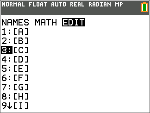
| 2. | Press ~ to navigate to the EDIT submenu. |
| 3. | Select from one of 10 allowed matrix variable names [A] – [J]. |
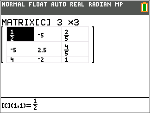
| 4. | Enter the dimension of the matrix, then enter values in each matrix cell. |
Note: Once in the editor, use the arrow keys to navigate between cells.
Example:
Matrix [C] as a 3x3 matrix is now in memory.
|
|