Using the TVM Solver
Using the TVM Solver
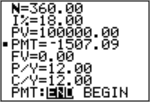
The TVM Solver displays the time-value-of-money (TVM) variables. Given four variable values, the TVM Solver solves for the fifth variable.
The FINANCE VARS menu section describes the five TVM variables (Ú ,æ, PV, PMT, and FV) and P/Y and C/Y.
PMT: END BEGIN in the TVM Solver corresponds to the FINANCE CALC menu items Pmt_End (payment at the end of each period) and Pmt_Bgn (payment at the beginning of each period).
To solve for an unknown TVM variable, follow these steps.
| 1. | Press Π[enter] [enter] to display the TVM Solver. The screen below shows the default values with the fixed-decimal mode set to two decimal places. |
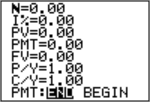
| 2. | Enter the known values for four TVM variables. |
Note: Enter cash inflows as positive numbers and cash outflows as negative numbers.
| 3. | Enter a value for P/Y, which automatically enters the same value for C/Y; if P/Y ≠ C/Y, enter a unique value for C/Y. |
| 4. | Select END or BEGIN to specify the payment method. |
| 5. | Place the cursor on the TVM variable for which you want to solve. |
| 6. | Press ƒ \. The answer is computed, displayed in the TVM Solver, and stored to the appropriate TVM variable. An indicator square in the left column designates the solution variable. |