Storing Strings to String Variables
String Variables
The
To display the VARS STRING menu, follow these steps.
| 1. | Press ½ to display the VARS menu. Move the cursor to 7:String. |

| 2. | Press Í to display the STRING secondary menu. |

Storing a String to a String Variable
To store a string to a string variable, follow these steps.
| 1. | Press ƒ W, enter the string, and press ƒ W. |
| 2. | Press ¿. |
| 3. | Press ½7 to display the VARS STRING menu. |
| 4. | Select the string variable (from Str1 to Str9, or Str0) to which you want to store the string. |
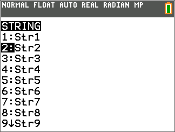
The string variable is pasted to the current cursor location, next to the store symbol (!).
| 5. | Press Í to store the string to the string variable. On the home screen, the stored string is displayed on the next line without quotation marks. |
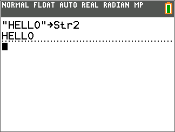
Displaying the Contents of a String Variable
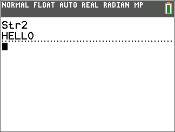
To display the contents of a string variable on the home screen, select the string variable from the VARS STRING menu, and then press Í. The string is displayed.