Values are stored to and recalled from memory using variable names. When you evaluate an expression that contains a variable name, the graphing calculator substitutes the value currently stored in that variable.
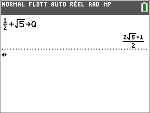
To store a value to a variable from the home screen or a program using the ¿ key, begin on a blank line and follow these steps.
| 1. | Enter the value you want to store. The value can be an expression. |
| 2. | Press ¿. |
! is copied to the cursor location.
| 3. | Press ƒ and then the letter of the variable to which you want to store the value. |
| 4. | Press Í. The graphing calculator evaluates the expression and stores the value to the variable. |
Displaying a Variable Value
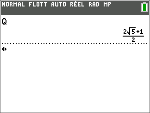
To display the value of a variable, enter the variable name on a blank line on the home screen, and then press Í.
Archiving Variables (Archive, Unarchive)
You can store variables in the TI-82 Advanced Edition Python user data archive, a protected area of memory separate from RAM. The user data archive lets you:
| • | Store data, programs, applications or any other variables to a safe location where they cannot be edited or deleted inadvertently. |
| • | Create additional free RAM by archiving variables. |
By archiving variables that you do not need to edit frequently, you can free up RAM for applications that may require additional memory.
The graphing calculator places an asterisk (ä) to the left of archived variables in most menus as well as in y L 2:Mem Management. If needed, you can use the Archive/UnArchive variables to manage the memory location.
Example:
If you archive a list named L1, you will see that it exists in memory. However, if you select and paste the name L1 to the home screen, it will not display on the home screen. You must unarchive it in order to see its contents and edit it.
Note: Image Vars are run and stored in archive, but when an Image Var displays in VARS 4:Picture & Background, the BACKGROUND menu does not display the asterisk ä.