Computing Cash Flows
The calculator solves for these cash-flow values:
|
•
|
Net present value (NPV) is the total present value of all cash flows, including inflows (cash received) and outflows (cash paid out). A positive NPV value indicates a profitable investment. |
|
•
|
Internal rate of return (IRR) is the interest rate at which the net present value of the cash flows is equal to 0. |
Computing NPV
|
1.
|
Press ( to display the current discount rate (I). |
|
2.
|
Key in a value and press !. |
|
3.
|
Press # to display the current net present value (NPV). |
|
4.
|
To compute the net present value for the series of cash flows entered, press C. |
Computing IRR
|
1.
|
Press ). The IRR variable and current value are displayed (based on the current cash-flow values). |
|
2.
|
To compute the internal rate of return, press C. The calculator displays the IRR value. |
When solving for IRR, the calculator performs a series of complex, iterative calculations that can take seconds or even minutes to complete. The number of possible IRR solutions depends on the number of sign changes in your cash-flow sequence.
|
•
|
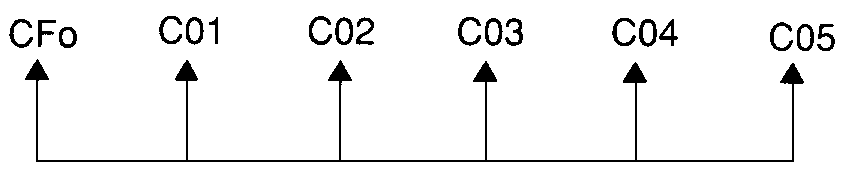
When a sequence of cash flows has no sign changes, no IRR solution exists. The calculator displays Error 5. |
|
•
|
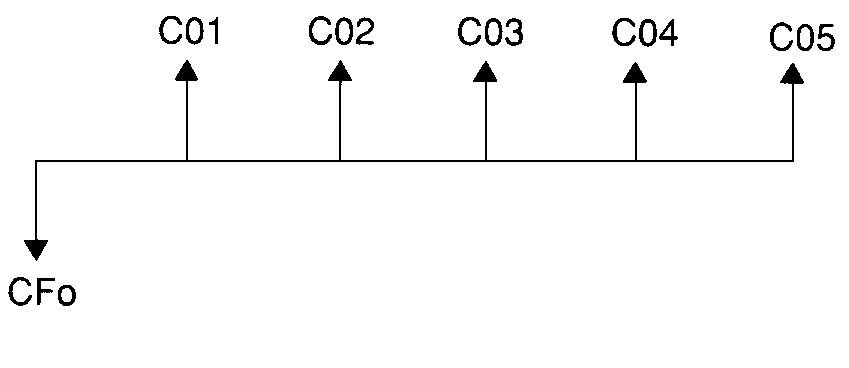
When a sequence of cash flows has only one sign change, only one IRR solution exists, which the calculator displays. |
|
•
|
When a sequence of cash flows has two or more sign changes: |
|
-
|
At least one solution exists. |
|
-
|
As many solutions can exist as there are sign changes. |
When more than one solution exists, the calculator displays the one closest to zero. Because the displayed solution has no financial meaning, you should use caution in making investment decisions based on an IRR computed for a cash-flow stream with more than one sign change.
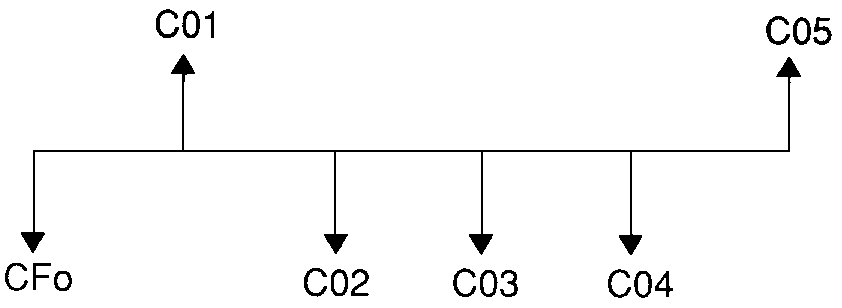
The time line reflects a sequence of cash flows with three sign changes, indicating that one, two, or three IRR solutions can exist.
|
•
|
When solving complex cash-flow problems, the calculator might not find IRR, even if a solution exists. In this case, the calculator displays Error 7 (iteration limit exceeded). |