Setup: TI Bluetooth® Adapter and Graphing Calculator

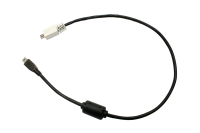
1. Identify the "micro-B" connector on the cable provided


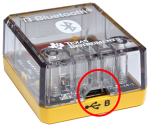
2. Insert the "micro-B" connector into the B port at the bottom of the TI Bluetooth® Adapter.


3. Insert the free end of the cable (the "A" connector) into the USB port on the graphing calculator.


4. Turn on the calculator if it is not already on.

The power LED on the TI Bluetooth® Adapter glows green to show that it has been recognized by the calculator and is receiving power.