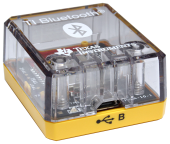
What is TI Bluetooth® Adapter?
The TI Bluetooth® Adapter connects to a CE Python or CX II graphing calculator to provide Bluetooth® connectivity. It allows the graphing calculator to talk to a single supported Bluetooth® accessory at a time.
Note: The minimum OS versions needed to support the adapter
| • | CE OS: v.5.8 or later |
| • | CX II OS: v6.0 or later |
Products Supported
Support for TI Bluetooth® Adapter on Python enabled CE graphing calculators
| • | TI-83 Premium CE Edition Python |
| • | TI-84 Plus CE Python |
| • | TI-84 Plus CE-T Python Edition |
Support for TI Bluetooth® Adapter on Python enabled CX II graphing calculators
| • | TI-Nspire™ CX II |
| • | TI-Nspire™ CX II CAS |
| • | TI-Nspire™ CX II-T |
| • | TI-Nspire™ CX II-T CAS |
| • | TI-Nspire™ CX II-C CAS |
Note: All products supported are Python enabled.
TI Bluetooth® Adapter – Overview
|
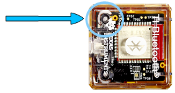
Micro USB Port for connecting to CE Python or CX II graphing calculator
No battery needed – powered by connecting to a CE Python or CX II graphing calculator |
|
||||||
|
Top view of TI Bluetooth® Adapter.
|
|