Site: US and Canada

TI Connect & App Instructions for Windows®

OS, Apps & Programs

How do I upgrade my Operating System (OS) and load Apps, Programs and Variables onto my calculator?

Updating your OS as well as adding Apps and Programs to your graphing calculator can give your device new features, support for new accessories and improved performance.

Important Note: Never disconnect a TI Connectivity Cable during a transfer.

Upgrading the OS
1. Connect the Device you would like to upgrade.
2. Open TI Connect™
3. Click on DeviceExplorer.
4. Once the device is found, click on the Tools link from the DeviceExplorer page and scroll to TI OS Downloader.
5. Make sure that the device you are using is listed in the window as well as the appropriate cable and click on Next.
6. If the calculator is on the screen with the blinking cursor, go ahead and click Start Download on TI Connect™. (If the calculator has lost its operating system, please see the Troubleshooting section for download instructions.)
7. The download should begin. There is a delay between the calculator and the computer so it may take a few seconds before the calculator displays the downloading screen
8. Once the calculator has completed downloading the OS, it will shut off. Unplug the unit from the computer and turn it on to display the latest OS.


Loading Apps, Programs and Variables

Note: You should already have the App or Program downloaded to your desktop in order to use the following instructions.

1. Connect the Device you would like to send an App or Program to.
2. Open TI Connect™
3. Click on DeviceExplorer.
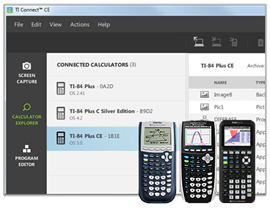
4. Once the device is found, the DeviceExplorer window will populate the internal components of your calculator.
5. Locate the App or Program on your desktop.
6. Left click on it and drag it and drop it onto the DeviceExplorer window.
7. There is a slight delay and then the transfer should start.
8. Once finished, unplug the calculator. You should be able to locate the downloaded item under your Apps or Programs section of your unit.

Learn More about Downloading Apps

Version: 1.20130516.105409 rev. 47177 (Production)