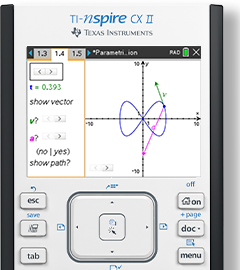
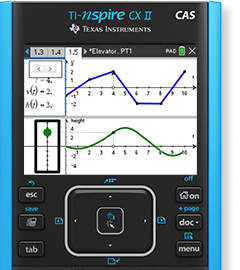
"With TI-Nspire technology, students are going to get involved and engrossed with what is happening on the screen. They are going to be able to interact with the mathematics. The light bulbs come on and that promotes classroom discussion."
When Roberta Pardo, a mathematics instructor at Chandler-Gilbert Community College (Chandler, AZ), introduced TI-Nspire™ handhelds to the 27 students in her beginning algebra class, she let them know right from the get-go that she still had a lot to learn about working the technology.
“If we were going to learn the technology, I needed to immerse them in how to work with it,” Pardo said. “I wanted them to figure it out, even how to put the batteries in from the start, and to just play with it. I was honest with them – there were going to be things I would not know how to do. Conveying such honesty up-front was a big part in getting them to buy into using TI-Nspire technology.”
Pardo featured TI-Nspire handheld in activities about twice a week at the start of the semester. During the 50-minute block of class time, her students followed teacher-directed TI-Nspire activities that featured the technology’s unique combination of enhanced graphing capabilities and computer features.
Recognizing different students have different impressions
The TI-Nspire handheld was perceived by students as quite different compared to traditional graphing calculators.
“My group of students was at about the same level in their knowledge of technology, whether they were traditional or non-traditional students,” Pardo said. “They all looked at the TI-Nspire handheld and said, ‘Wow, this is completely different than any calculator I have ever seen.’ Fifty minutes of using it in each class is not a long time. They needed to experience it on their own time, too.”
Students asked Pardo for time to explore TI-Nspire functionality to help increase their proficiency. They also wanted opportunities to collaborate with fellow classmates to share tips and useful shortcuts.
As the semester progressed, Pardo’s traditional, more tech-savvy students picked up the technology a little faster than her non-traditional students. The traditional students showed a willingness to assist non-traditional students in finding short-cuts faster.
Letting students use the technology full-time
About three weeks into the semester, Pardo allowed her students to take a handheld with them to continue assignments outside of class.
“That’s when they really became comfortable in what we were doing with the technology,” Pardo said. “I think giving them the opportunity to have a sense of ownership (of the handheld) was so important. This helped tremendously. If they were not able to take the technology home, my students would have been a lot more frustrated in class.
About five weeks later, her students began to show noticeable progress in class. They made mathematical connections more quickly, entered into classroom discussions more often and their overall comprehension level improved. (Read the complete case study - PDF.)
“TI-Nspire technology seemed to really reinforce conceptual understanding,” Pardo said.
Evaluating what works and what sticks
Pardo drew on pre-created TI-Nspire documents primarily from TIMath.com, a TI Web site that includes subject-specific, classroom-ready activities for educators to download and customize as needed.
“I spend a lot more time looking at new activities I can actually use on the handheld – activities that would support whichever Algebra topic I might be covering at a certain point in time during the semester,” Pardo said. “I do think that the value I obtain when I find or create a good activity is worth it. The amount of understanding my students achieve far outweighs the extra time I spend preparing.”
Modifying the TIMath.com activities contributes to greater prep time; however, Pardo finds it effective in communicating “cool ideas” that she can align with relevant topics in her course’s textbook.
“My biggest difficulty is deciding which activities or which concepts are best taught using TI-Nspire technology. Right now, I’m taking notes regarding what seems to work, or not work, and will re-examine everything come August (at the beginning of a new semester). It’s more of a feeling of how my students reacted to what we did in class.
“It’s no longer just the manipulation of keys (on a calculator) like it has been in the past. With TI-Nspire technology, students are going to get involved and engrossed with what is happening on the screen. They are going to be able to interact with the mathematics. The light bulbs come on and that promotes classroom discussion.”
When Pardo introduced the TI-Nspire handheld to her Beginning Algebra students, they found it fascinating but did not immediately understand it.
“So I had them solve the linear equation for the specific input value given a unique output,” Pardo said. “After a couple of examples, they understood what the handheld was doing and ‘believed’ that it was correct. Once they saw that their paper and pencil answers were the same, they were able to focus on the graph and better understand that we were describing a point on the line. From this point on, they were able to find the point and give its practical meaning in an application problem.”
Prior to students solving a quadratic equation using the quadratic formula, Pardo had her students manipulate the situation by using a point on the line. Since most of these students were from the previous semester (Pardo’s Beginning Algebra class), they were familiar with the handheld’s ability to help them reach a correct answer and that it was a point on the parabola.
“I believe this function of the handheld offers great insight to students and allows them to see the connection between algebraic and graphical problem-solving approaches,” Pardo said.
Redesigning the test for more than one right answer
Such interaction has also impacted how Pardo conducts her end-of-semester testing. Questions once appropriate when using traditional graphing calculators no longer apply in the same way.
“I have noticed certain things I am going to have to change (on my exams) to accommodate how my students learn with TI-Nspire handhelds,” Pardo said. “Subtle things that reflect how I had taught a concept before but now am teaching differently with TI-Nspire technology. It’s pushing me to ask better questions.”
An example: “If students were asked to get pizza from a place across the street, how might they go about doing that? Students would likely answer to simply cross the road by going to the corner and using the sidewalk. That’s just one of many different ways of getting across the street…. I’m looking for how students will problem solve in going to get their pizza. Now I need to be a lot more specific in what I want my students to tell me (in arriving at more than one right answer). By using TI-Nspire technology, I am guiding them to use multiple representations, so my questions have to lead more into that kind of approach to exploration.
I should not be asking the same questions as I once did.”
Encouraging colleagues to embrace the technology
Approximately 75 percent of Pardo’s classroom instruction incorporates the use of
TI-Nspire handhelds and the other 25 percent, TI-Nspire Computer Software (student version) in a campus computer lab setting.
Every full-time instructor has licensed access to the computer software on their office computers and every teaching station in classrooms.
“I use it all the time,” Pardo said. “I have shown my colleagues what they can do, letting them know it is available for them to start exploring on their own. I’m planning to email them occasionally some ready-to-use TI-Nspire activities and through the power of suggestion, get them to consider the technology.”
Recognizing the signs of things to come
More students are now entering Chandler-Gilbert Community College having already purchased their own TI-Nspire handhelds, according to Pardo. In her Beginning Algebra and Intermediate Algebra courses, as well as those taught by fellow faculty members, Pardo estimates that approximately one student in every three classes owns a TI-Nspire handheld.
“As a division, we know that we are going to have to prepare ourselves (for the future influx of students coming into class with TI-Nspire handhelds),” she said. “I think after next school year, we are going to make TI-Nspire workshops a priority for faculty. Our faculty and adjunct faculty are very open to technology. They are looking to me to give them as many answers as possible.”
|